Loading
Get Rgs Online
How it works
-

Open form follow the instructions
-

Easily sign the form with your finger
-

Send filled & signed form or save
How to fill out the Rgs Online online
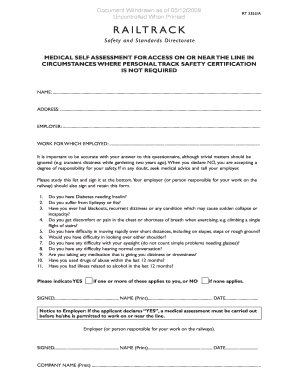
Filling out the Rgs Online form is an essential step for individuals needing to complete a medical self-assessment for access on or near the railway line. This guide provides clear and supportive instructions to assist you in accurately completing the necessary sections of the form.
Follow the steps to fill out the Rgs Online form effectively.
- Click the ‘Get Form’ button to access the Rgs Online form and open it in your preferred online platform.
- Begin by filling out the 'Name' section at the top of the form. Ensure you provide your full name as it appears in official documents.
- Next, complete the 'Address' field with your current residential address, including street number, city, and zip code.
- Provide your 'Employer' details by entering the name of the organization you work for.
- In the 'Work for which employed' section, describe your job title or role within the company.
- Review the list of health questions carefully, indicating 'YES' or 'NO' for each question based on your health condition. Be honest and accurate.
- If you answered 'YES' to any health questions, note that a medical assessment is required before proceeding to work on or near the railway line.
- Once you've completed the questionnaire, sign the form by entering your name and the date at the bottom.
- Your employer or the person responsible for your work must also sign the form, printing their name and providing the date.
- Finally, save your changes, download a copy of the completed form, print it for your records, or share the form as required.
Complete your Rgs Online form today to ensure your access on or near the railway line.
Online: complete the quick and easy application form for instant access to exclusive membership opportunities. By post: If you prefer to apply by post, simply download and complete the application form, and post it to us with your payment to: Membership Office, RGS-IBG, 1 Kensington Gore, London, SW7 2AR.