Loading
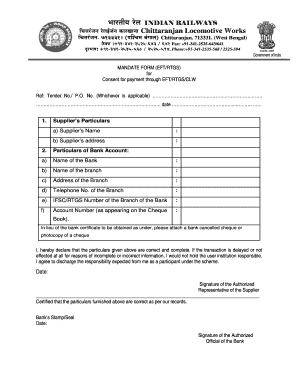
Get Irs Mandate Form - Chittaranjan Locomotive Works
How it works
-

Open form follow the instructions
-

Easily sign the form with your finger
-

Send filled & signed form or save
How to fill out the Irs Mandate Form - Chittaranjan Locomotive Works online
Filling out the Irs Mandate Form for Chittaranjan Locomotive Works is a straightforward process that allows users to provide necessary banking details for electronic payments. This guide will walk you through each section of the form, ensuring that you complete it accurately and efficiently.
Follow the steps to fill out the form correctly.
- Press the ‘Get Form’ button to retrieve the form and access it for completion.
- Begin by entering the supplier's particulars. Fill in your name in the designated field labeled 'Supplier’s Name' and provide your complete address in the space marked 'Supplier’s address'.
- Next, move to the 'Particulars of Bank Account' section. Here, input the name of your bank in the field labeled 'Name of the Bank'.
- Proceed to specify the 'Name of the branch' and then provide the 'Address of the Branch'. Ensure that the details are accurate.
- In this step, to ensure the contact information is complete, add the 'Telephone No. of the Branch'.
- Fill in the 'IFSC/RTGS Number of the Branch of the Bank' for electronic fund transfer purposes.
- Input your 'Account Number' as it appears on your cheque book to finalize this section.
- Attach a bank canceled cheque or a photocopy of your cheque to support your bank account details as requested.
- In the declaration section, read the statement carefully. Confirm the accuracy of the provided information before signing. Include the date and signature of the authorized representative.
- Finally, ensure that a bank official certifies the details by providing their signature, the bank's stamp, and the date before submitting the form. At this point, you can save your changes, download, print, or share the completed form as needed.
Complete the Irs Mandate Form online today to streamline your payment processes.
A sequence of # characters in a cell usually indicates that the cell is not wide enough to display the value in it. Besides, ##### can appear in cells containing negative date or time values. Custom number formats. The number sign is also used as a digit placeholder in Excel number formats.