Loading
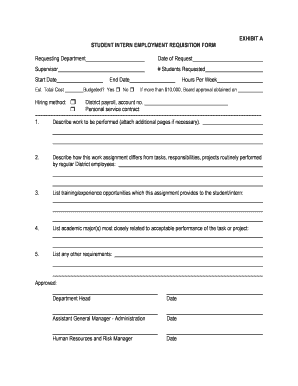
Get Student Requisition
How it works
-

Open form follow the instructions
-

Easily sign the form with your finger
-

Send filled & signed form or save
How to fill out the Student Requisition online
Completing the Student Requisition online can be a straightforward process if you follow the appropriate steps. This guide provides detailed instructions to help you accurately fill out each section of the form.
Follow the steps to successfully complete the Student Requisition online.
- Press the ‘Get Form’ button to access the Student Requisition form and open it in your preferred editor.
- Begin by entering the requesting department in the designated field. This should reflect the department responsible for the requisition.
- Next, input the date of your request, ensuring the format is clear and accurate.
- Fill in the supervisor's name who will oversee the internship or student assignment.
- Indicate the number of students requested in the corresponding field. This helps to determine the scope of the requisition.
- Specify the start date for the assignment. Be precise to ensure proper scheduling.
- Enter the estimated total cost for the student's assignment, which assists in budget planning.
- Select the hiring method from the available options. Depending on your choice, certain sections may become relevant.
- Input the end date of the assignment, ensuring it aligns with project timelines.
- Indicate whether the position is budgeted by selecting ‘Yes’ or ‘No’.
- Specify the expected hours per week the student will work to provide a clear time commitment.
- If applicable, note the date on which Board approval was obtained for assignments projected to exceed $10,000.
- Provide the District payroll account number or choose the personal service contract as the payment method.
- In the subsequent fields, describe the work to be performed. Attach additional pages if necessary to provide full details.
- Explain how this assignment differs from tasks performed by regular District employees to highlight its uniqueness.
- List the training and experience opportunities this assignment offers the student/intern.
- Identify academic majors most aligned with the tasks or projects involved in this position.
- Mention any other specific requirements relevant to the position to ensure clarity.
- Once all fields are completed, ensure you secure approvals from the department head and relevant managers.
- Finally, save your changes, and consider downloading, printing, or sharing the document as required.
Begin filling out your Student Requisition online today for a seamless submission experience.
A requisition number is a unique number that's usually system-generated to identify the job role when another employment requisition is filed. Having a requisition number means that reqs can quickly be accessed on the applicant tracking system.
Industry-leading security and compliance
US Legal Forms protects your data by complying with industry-specific security standards.
-
In businnes since 199725+ years providing professional legal documents.
-
Accredited businessGuarantees that a business meets BBB accreditation standards in the US and Canada.
-
Secured by BraintreeValidated Level 1 PCI DSS compliant payment gateway that accepts most major credit and debit card brands from across the globe.