Loading
Get 18006619608
How it works
-

Open form follow the instructions
-

Easily sign the form with your finger
-

Send filled & signed form or save
How to fill out the 18006619608 online
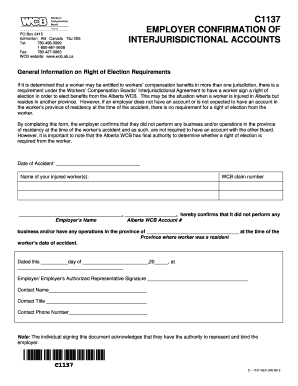
This guide provides a clear and supportive approach to filling out the 18006619608 form online. Designed for users with varying levels of experience, it breaks down each component of the form for easy understanding.
Follow the steps to successfully complete the form.
- Click ‘Get Form’ button to obtain the form and open it in the editor.
- Enter the date of the accident in the specified field. This date is crucial as it marks the beginning of the claim process.
- List the name of your injured worker(s) in the provided space. Ensure to include full names for accuracy.
- Input the WCB claim number associated with the worker's injury. Confirm that this number is correct to prevent any processing issues.
- Confirm that no business operations were performed in the province of the worker's residency at the time of the accident. Fill in the province name where applicable.
- Sign the form as the employer or authorized representative. Ensure that the person signing has the authority to do so.
- Provide the contact name, title, and phone number in the designated fields. These details will be used for any follow-up inquiries.
- After completing the form, save your changes, then choose to download, print, or share the document as needed.
Begin filling out your documents online today for a streamlined experience.