Loading
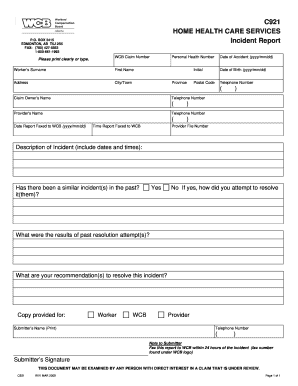
Get Care Home Incident Report Template
How it works
-

Open form follow the instructions
-

Easily sign the form with your finger
-

Send filled & signed form or save
How to fill out the Care Home Incident Report Template online
Filling out the Care Home Incident Report Template online can ensure that incidents are documented accurately and efficiently. This guide provides step-by-step instructions to help you complete the form with ease and confidence.
Follow the steps to complete the form online.
- Click ‘Get Form’ button to access the incident report template and launch it in the online editor.
- Begin by entering the personal health number in the designated field. This number is crucial for identifying the individual involved in the incident.
- Next, input the WCB claim number, ensuring that it corresponds to the worker involved in the incident.
- Provide the worker's last name and first name. Make sure to spell these names clearly and accurately.
- Fill in the worker's address, city/town, province, and postal code. Confirm all details are correct to avoid delays.
- Enter the date of the accident using the format yyyy/mm/dd. This date is essential for record-keeping.
- Include the worker's date of birth in the same format as before (yyyy/mm/dd).
- Add the telephone number of the worker, ensuring to include the area code.
- List the claim owner's name and their contact telephone number.
- Indicate the provider’s name along with their telephone number.
- Record the date and time the report is sent to WCB, using the specified format for both entries.
- Write a detailed description of the incident, including important dates and times that provide context for the situation.
- Answer whether there have been similar incidents in the past. If yes, describe how those incidents were handled.
- Summarize the outcomes of any past resolutions and include any recommendations for addressing the current incident.
- At the end of the form, print your name in the ‘Submitter's Name’ section along with your contact number.
- Remember to fax the completed report to WCB within 24 hours of the incident occurrence.
- Finally, provide your signature in the designated area to confirm the accuracy of the information provided.
- Once you have completed all sections, save any changes, and choose to download, print, or share the form as necessary.
Complete your Care Home Incident Report Template online today for accurate documentation of incidents.
Get form
Experience a faster way to fill out and sign forms on the web. Access the most extensive library of templates available.
What Information Do You Put in an Incident Report? Detailed description of the event with events listed chronologically. Witnesses or injured party statements. Injuries sustained by the person(s) as a result of the incident or the outcome. Actions taken immediately after the incident occurred. Treatments administered.
Get This Form Now!
Use professional pre-built templates to fill in and sign documents online faster. Get access to thousands of forms.