Loading
Get Arcadia Local Schools
How it works
-

Open form follow the instructions
-

Easily sign the form with your finger
-

Send filled & signed form or save
How to fill out the ARCADIA LOCAL SCHOOLS online
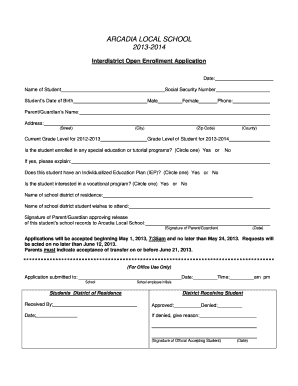
This guide provides step-by-step instructions on how to complete the ARCADIA LOCAL SCHOOLS Interdistrict Open Enrollment Application online. Follow these directions carefully to ensure that all required information is submitted accurately.
Follow the steps to successfully complete your application.
- Use the ‘Get Form’ button to access the application. This will allow you to open the form in the appropriate online format.
- Enter the date in the designated field at the top of the form. This should reflect the current date when you are filling out the application.
- Provide the name of the student in the corresponding field. Ensure that the spelling is correct and matches any official documents.
- Input the student's Social Security Number in the specified section. This is important for identification purposes.
- Fill in the student’s date of birth accurately. This information helps verify the student’s age for school enrollment.
- Select the student's gender by choosing either 'Male' or 'Female' as indicated on the form.
- Enter a valid phone number where the parent or guardian can be reached for any inquiries regarding the application.
- Provide the parent or guardian’s name in the relevant field. This should be the person who is completing the application.
- Complete the address section with the street, city, zip code, and county where the family resides. This ensures proper identification of residency.
- Indicate the current grade level for the 2012-2013 academic year as well as the grade level for 2013-2014 that the student will be entering.
- Answer the question regarding the student’s enrollment in special education or tutorial programs by circling 'Yes' or 'No.' If applicable, provide further details in the space provided.
- Respond to whether the student has an Individualized Education Plan (IEP) by circling 'Yes' or 'No.'
- Indicate the student's interest in a vocational program by choosing 'Yes' or 'No' as prompted by the form.
- Fill in the name of the school district of residence and the name of the school district the student wishes to attend.
- The parent or guardian must sign the application to approve the release of the student’s school records to Arcadia Local Schools. Ensure to date this signature.
- Review all entered information for accuracy before submission. Ensure all required fields are filled out appropriately.
- After completing the form, save changes, and proceed to download, print, or share the completed application as necessary.
Complete your ARCADIA LOCAL SCHOOLS application online today to ensure timely enrollment.
Residents of the City of Arcadia are served by six elementary schools, three middle schools, one high school, and one learning center as part of Arcadia Unified School District.
Industry-leading security and compliance
US Legal Forms protects your data by complying with industry-specific security standards.
-
In businnes since 199725+ years providing professional legal documents.
-
Accredited businessGuarantees that a business meets BBB accreditation standards in the US and Canada.
-
Secured by BraintreeValidated Level 1 PCI DSS compliant payment gateway that accepts most major credit and debit card brands from across the globe.