Loading
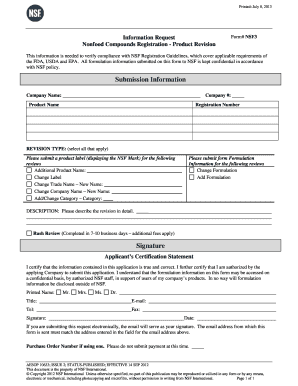
Get Product Revision Form - Nsf3 - Nsf International - Nsf
How it works
-

Open form follow the instructions
-

Easily sign the form with your finger
-

Send filled & signed form or save
How to fill out the Product Revision Form - NSF3 - NSF International - Nsf online
This guide provides a comprehensive overview of the Product Revision Form - NSF3 used for nonfood compounds registration. It outlines the necessary steps for accurately completing the form online to ensure compliance with NSF Registration Guidelines.
Follow the steps to fill out the Product Revision Form correctly.
- Press the ‘Get Form’ button to obtain the Product Revision Form, and access it in your preferred online editor.
- Fill in the 'Company Name' section with the name of your company as it appears in official records.
- Enter your 'Company #' to identify your business within the NSF system.
- Provide the 'Product Name' associated with the product you are revising.
- Input the 'Registration Number' assigned to your product for tracking.
- In the 'REVISION TYPE' section, select the applicable options, including changes to the label, trade name, company name, or category.
- Include any additional product names in the designated field as needed.
- If applicable, submit a product label that displays the NSF Mark.
- If you are changing the formulation, note this in the 'Formulation Information' section.
- In the 'DESCRIPTION' field, describe the revision comprehensively.
- Optionally, you can request a 'Rush Review' which will expedite processing for an additional fee.
- Complete the 'Applicant’s Certification Statement' by certifying that all information is true and that you are authorized to submit the application.
- Fill in the 'Printed Name,' 'Title,' 'E-mail,' 'Tel,' and 'Fax' fields with your contact information.
- Sign and date the form. If submitting electronically, your email will serve as your signature.
- If you are using a purchase order number, enter it in the designated area, but do not submit payment at this time.
- Once you have completed all sections, save your changes, download, print, or share the form as needed.
Complete your Product Revision Form online today for a smooth submission process.
The Basics of Dual-Currency Invoicing Here's an example: An American exporter sends a Japanese buyer an invoice for goods that allows them to pay only in U.S. dollars. A European exporter sends that same Japanese buyer an invoice that allows them to pay in either Euros or Japanese Yen.
Industry-leading security and compliance
US Legal Forms protects your data by complying with industry-specific security standards.
-
In businnes since 199725+ years providing professional legal documents.
-
Accredited businessGuarantees that a business meets BBB accreditation standards in the US and Canada.
-
Secured by BraintreeValidated Level 1 PCI DSS compliant payment gateway that accepts most major credit and debit card brands from across the globe.