Loading
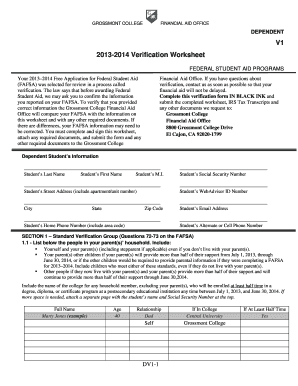
Get Verfication Worksheet Dv1 Grossmont Form
How it works
-

Open form follow the instructions
-

Easily sign the form with your finger
-

Send filled & signed form or save
How to fill out the Verfication Worksheet Dv1 Grossmont Form online
Filling out the Verfication Worksheet Dv1 Grossmont Form is an essential step in the financial aid process for students at Grossmont College. This guide will provide you with clear, step-by-step instructions on completing this form online, ensuring you provide all necessary information accurately.
Follow the steps to complete the form accurately online.
- Click the ‘Get Form’ button to retrieve the Verfication Worksheet Dv1 Grossmont Form and open it in your preferred editing tool.
- Begin by filling out the dependent student's information section, which includes your last name, first name, middle initial, social security number, street address, city, state, zip code, email address, and phone numbers. Ensure that all information is accurate and clearly written.
- Proceed to Section 1.1, where you need to list everyone in your parent's household. Include yourself, your parents (and steparents, if applicable), and any siblings or other dependents who live with your parents and receive more than half of their support.
- Complete Section 1.2, providing information about your income. If you or your parents filed a tax return, indicate whether you used the IRS Data Retrieval Tool, or if not, make sure to submit the appropriate IRS Tax Return Transcript.
- In Section 1.3, report any untaxed income for the year 2012. Provide a detailed list and ensure to fill out every item. If an item does not apply, write '0'.
- Continue to Section 1.4 to indicate if you or your parents received any assistance programs in 2012. Mark the applicable boxes.
- In Section 1.5, provide your parents' income information, following the same instructions as you did for your income. Make sure to check whether they filed tax returns or if they are nonfilers.
- Complete Section 1.6 for any untaxed income received by your parents, and Section 1.7 to indicate benefits received by your parents during the year 2012.
- If applicable, fill out Section 2 regarding SNAP verification, and Section 3 concerning child support paid by your parents.
- Finally, certify that all the information you provided is complete and correct. Both you (the student) and a parent must sign the worksheet and date it.
- After completing the form, save your changes, then download, print or share the verification worksheet and any required documents to submit to the Grossmont College Financial Aid Office.
Submit your verification worksheet online today to ensure timely processing of your financial aid!
Related links form
The Verification Worksheet is a document the Financial Aid Office sends to you if you've been selected for a process called “verification.” The U.S. Department of Education selects applicants for this process when it wants us to confirm the information submitted on a FAFSA.