Loading
Get Infoclique
How it works
-

Open form follow the instructions
-

Easily sign the form with your finger
-

Send filled & signed form or save
How to fill out the Infoclique online
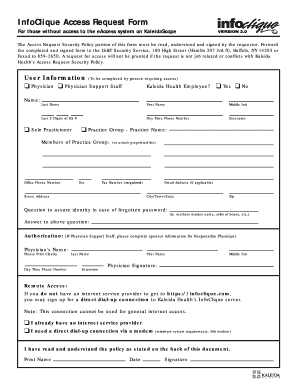
This guide provides a comprehensive walkthrough on how to complete the Infoclique Access Request Form online. Designed to assist users in gaining access to the eAccess system, it outlines the necessary steps and requirements in a clear and supportive manner.
Follow the steps to successfully complete your Infoclique Access Request Form.
- Press the ‘Get Form’ button to retrieve the Infoclique Access Request Form and display it in your editor.
- In the User Information section, indicate your role by selecting from the options provided, such as Physician or Physician Support Staff. Fill in your name, last three digits of your Social Security number, and contact information, including your daytime phone number and extension.
- If applicable, indicate your employment status with Kaleida Health by selecting 'Yes' or 'No'. If you are part of a practice group, provide the name of the group and the office phone number. Additionally, include your fax number and mailing address.
- Fill out the identity assurance question along with your answer, which will be needed in case you forget your password. Ensure clarity and privacy with your answer.
- If you are Physician Support Staff, complete the sponsorship information by providing the name, phone number, and extension of the Responsible Physician. Including their signature is essential for verification.
- In the Remote Access section, specify whether you currently have an internet service provider or if you require a direct dial-up connection. Note that the system requirements for dial-up access are a minimum 56k modem.
- Acknowledge you have read and understood the Access Request Security Policy by signing and dating the form.
- Once all fields are completed, save the changes, then proceed to download, print, or share the Infoclique Access Request Form as needed.
Complete your Infoclique Access Request Form online today to ensure efficient access and compliance.
More than one million sick or injured patients choose a Kaleida Health facility annually, including Buffalo General Medical Center/Gates Vascular Institute, DeGraff Medical Park, Millard Fillmore Suburban Hospital, John R. Oishei Children's Hospital, and Bradford Regional Medical Center and Olean General Hospital.
Industry-leading security and compliance
US Legal Forms protects your data by complying with industry-specific security standards.
-
In businnes since 199725+ years providing professional legal documents.
-
Accredited businessGuarantees that a business meets BBB accreditation standards in the US and Canada.
-
Secured by BraintreeValidated Level 1 PCI DSS compliant payment gateway that accepts most major credit and debit card brands from across the globe.