Loading
Get Tutorial Feedback Form - Ehib
How it works
-

Open form follow the instructions
-

Easily sign the form with your finger
-

Send filled & signed form or save
How to fill out the Tutorial Feedback Form - Ehib online
The Tutorial Feedback Form - Ehib is designed to gather user insights and feedback on tutorials. Filling out this form online is a straightforward process that allows users to express their opinions clearly and effectively.
Follow the steps to complete the Tutorial Feedback Form - Ehib online.
- Click ‘Get Form’ button to obtain the form and open it for editing.
- Begin by entering your name in the designated field at the top of the form.
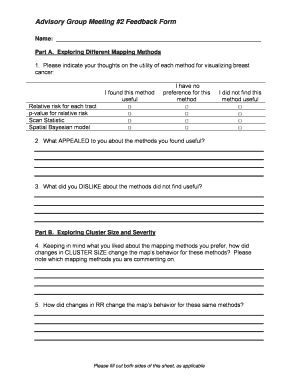
- Proceed to Part A, where you will assess various mapping methods. Indicate your thoughts on the utility of each method for visualizing breast cancer by checking the appropriate boxes for each method.
- In Part A, question 2, provide comments on what appealed to you about the methods you found useful.
- Next, in question 3 of Part A, describe what you disliked about the methods you did not find useful.
- Move to Part B, question 4. Reflect on how changes in cluster size affected the behavior of the mapping methods you prefer, noting which methods you are commenting on.
- Continue to question 5 in Part B to discuss how changes in relative risk impacted the map’s behavior for the same methods.
- In Part C, question 6, copy the reporting codes of the maps you prefer using your selected mapping methods.
- Answer question 7 regarding staff interaction by marking 'Yes' or 'No' and providing names if applicable.
- Be sure to fill out both sides of the sheet as applicable.
- Finally, save your changes, download the completed form, print it, or share it as needed.
Complete the Tutorial Feedback Form - Ehib online today to provide your valuable feedback.
Enter your Employee Number as the “User ID” and eHub.aus.com as the “eHub Website”. Enter the information requested to validate your personal identification. Create a 4 digit PIN that enables you to login quickly when reopening the app.
Industry-leading security and compliance
US Legal Forms protects your data by complying with industry-specific security standards.
-
In businnes since 199725+ years providing professional legal documents.
-
Accredited businessGuarantees that a business meets BBB accreditation standards in the US and Canada.
-
Secured by BraintreeValidated Level 1 PCI DSS compliant payment gateway that accepts most major credit and debit card brands from across the globe.