Loading
Get Police Application
How it works
-

Open form follow the instructions
-

Easily sign the form with your finger
-

Send filled & signed form or save
How to fill out the Police Application online
This guide provides clear and supportive instructions on how to fill out the Police Application online. Whether you are familiar with this type of document or it is your first experience, we aim to make the process straightforward for you.
Follow the steps to successfully complete your Police Application.
- Click ‘Get Form’ button to access the application form and open it in your document editor.
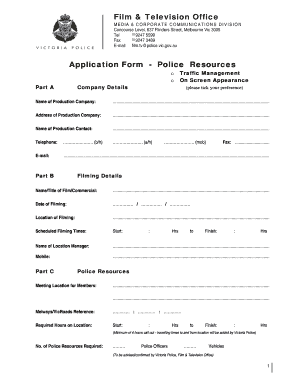
- Begin with Part A by filling in your company details. Provide the name, address, contact person, their telephone numbers, and email address. Make sure to check all information for accuracy.
- Proceed to Part B to indicate the filming details. Enter the title of your film or commercial, the filming date, the filming location, and scheduled filming times. Be thorough in providing the name and contact for the location manager.
- In Part C, specify the meeting location for police resources. Include any relevant reference information such as Melways or VicRoads references. Detail the required hours for police presence at the location, ensuring you meet the minimum requirement.
- Complete Part D by addressing filming plans and approvals. Tick the boxes to indicate if the traffic management plan, VicRoads approval, council approval, and Translink Operations approval have been sought or granted. Ensure that all necessary documentation is attached or noted.
- Upload a certified copy of your insurance/public liability policy indicating a minimum cover of $10 million. This should be included within your application submission.
- Ensure you complete the community notifications section, indicating if notifications were given through letter drop, verbally, or both.
- Provide a detailed description of your filming activity in the space provided. This will help clarify the nature of the filming to the authorities.
- Once you have completed all sections of the application, review the form for any errors. Save your changes, and then download, print, or share the form as needed.
Complete your application online today to ensure a smooth filming experience.
Related links form
An FRN must fail at least one fitness measurement to be considered unfit. Conversely, if an FRN marginally passes multiple fitness measurements the FRN is still considered fit.
Industry-leading security and compliance
US Legal Forms protects your data by complying with industry-specific security standards.
-
In businnes since 199725+ years providing professional legal documents.
-
Accredited businessGuarantees that a business meets BBB accreditation standards in the US and Canada.
-
Secured by BraintreeValidated Level 1 PCI DSS compliant payment gateway that accepts most major credit and debit card brands from across the globe.