Loading
Get Manual Change Of Administrative Contact Email Address Non - Cira
How it works
-

Open form follow the instructions
-

Easily sign the form with your finger
-

Send filled & signed form or save
How to fill out the Manual Change Of Administrative Contact Email Address Non - CIRA online
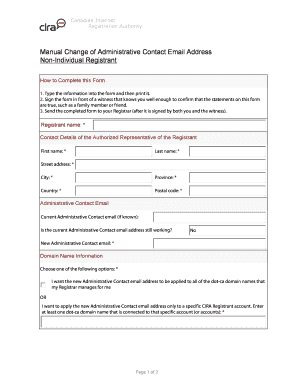
This guide provides a clear and comprehensive approach to filling out the Manual Change Of Administrative Contact Email Address Non - CIRA online. Users will receive step-by-step instructions for each section of the form to ensure a smooth process.
Follow the steps to complete your form accurately.
- Press the ‘Get Form’ button to access the form and open it in your preferred editor.
- Begin by filling in the registrant name at the top of the form, ensuring accuracy as this identifies your account.
- Complete the contact details of the authorized representative. You will need to enter their first name, last name, street address, city, province, country, and postal code.
- In the 'Administrative Contact Email' section, first provide the current administrative contact email address if known. Then indicate if the current email address is still active by selecting 'No' if it is not.
- Next, enter the new administrative contact email address ensuring it is accurate and accessible.
- Select one of the options regarding domain name information. You may either apply the change to all dot-ca domain names managed by your registrar or specify a particular CIRA registrant account by entering at least one associated dot-ca domain name.
- In the 'Authorized Representative Certification' section, ensure that the authorized representative certifies their authority to submit the request, their compliance with regulations, and the truthfulness of the provided information before signing and dating the form.
- Fill in the witness details, including their first name, last name, street address, city, province, country, and postal code.
- The witness must sign and date the form after certifying that they know the authorized representative well enough to confirm the truth of their statements.
- Once all sections are completed, review the form for any errors. Finally, save your changes and proceed to print, download, or share the completed form as needed.
Complete your Manual Change Of Administrative Contact Email Address Non - CIRA form online today.
sets forth the terms and conditions of the registration of Domain Names by the. Registrant with CIRA. The Registrant acknowledges that it has read, understood, and agrees to be bound by all the terms and conditions of this. Agreement, and the Registry PRP, which CIRA may establish and amend from time.
Industry-leading security and compliance
US Legal Forms protects your data by complying with industry-specific security standards.
-
In businnes since 199725+ years providing professional legal documents.
-
Accredited businessGuarantees that a business meets BBB accreditation standards in the US and Canada.
-
Secured by BraintreeValidated Level 1 PCI DSS compliant payment gateway that accepts most major credit and debit card brands from across the globe.