Loading
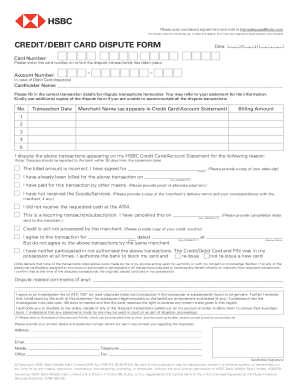
Get Credit/debit Card Dispute Form - Hsbc - Hsbc
How it works
-

Open form follow the instructions
-

Easily sign the form with your finger
-

Send filled & signed form or save
How to fill out the Credit/debit Card Dispute Form - Hsbc - Hsbc online
Filing a dispute regarding a transaction on your HSBC credit or debit card can be straightforward when using the right form. This guide will help you understand how to accurately fill out the Credit/debit Card Dispute Form provided by HSBC online, ensuring you include all necessary information for a successful dispute process.
Follow the steps to fill out the form correctly.
- Click the ‘Get Form’ button to access the Credit/debit Card Dispute Form and open it in the editor for filling out.
- Enter the date at the top of the form to indicate when you are submitting the dispute.
- Provide your card number in the designated field. This should be the card on which the disputed transaction occurred.
- If you are submitting a debit card dispute, include your account number in the appropriate section.
- Fill in your full name as the cardholder in the specified field.
- List the transaction details for each disputed transaction in the table provided. Include the transaction number, date, merchant name, and billing amount. If you have multiple transactions to dispute, use additional copies of the form.
- Specify the reason for disputing the transactions. Choose from the provided options, such as incorrect billed amount, previous payment, non-receipt of goods/services, or unauthorized transactions. Be sure to provide any required documentation as evidence.
- If applicable, include your comments related to the dispute in the comments section.
- Read and acknowledge the statement regarding the investigation fee and the investigation process duration, confirming your understanding and agreement by signing in the designated area.
- Finally, enter your contact details, including your address, email, mobile, and telephone number, so the bank can reach you about the dispute.
- After completing the form, save your changes and choose to download, print, or email it as required.
Complete your Credit/debit Card Dispute Form online today for a smooth dispute process.
Online Banking customers can submit most credit card disputes directly from the transaction detail found in the Activity tab on your credit card account page, or from the Dispute a transaction link on the Information & Services tab. To access the credit card dispute process, log in to Online Banking.