Loading
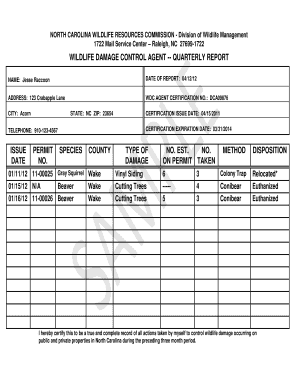
Get Nc Wdca Reportimg
How it works
-

Open form follow the instructions
-

Easily sign the form with your finger
-

Send filled & signed form or save
How to fill out the Nc Wdca Reportimg online
Filling out the Nc Wdca Reportimg online is a straightforward process that allows wildlife damage control agents to report their activities efficiently. This guide will walk you through each section of the form to ensure you complete it correctly and confidently.
Follow the steps to complete the Nc Wdca Reportimg online.
- Press the ‘Get Form’ button to access the Nc Wdca Reportimg form and open it in your preferred editor.
- Begin by entering your NAME in the designated field. Be sure to provide your full legal name as it appears on your certification.
- In the DATE OF REPORT section, input the current date when you are filling out the report.
- Fill in your ADDRESS, including the street address, followed by your CITY, STATE, and ZIP code.
- Provide your WDC AGENT CERTIFICATION NO. in the specified field to verify your status as a wildlife damage control agent.
- Record your CERTIFICATION ISSUE DATE and CERTIFICATION EXPIRATION DATE, using the proper format for both dates.
- Enter your TELEPHONE number to ensure you can be contacted if needed.
- For the issue details, fill out the ISSUE DATE, PERMIT NO., SPECIES, COUNTY, TYPE OF DAMAGE, NUMBER ESTIMATED, NUMBER ON PERMIT TAKEN, METHOD, and DISPOSITION for each wildlife control action you have taken.
- Review the completed form for accuracy. Make sure all required fields are filled out correctly.
- After finalizing the report, you can save your changes, and choose to download, print, or share the form as necessary.
Start completing your Nc Wdca Reportimg online today!
Each year, employers are required to file Form 1095-C with the IRS and provide a copy to all employees who were full-time or were enrolled in self-insured coverage for one or more months during the year.
Industry-leading security and compliance
US Legal Forms protects your data by complying with industry-specific security standards.
-
In businnes since 199725+ years providing professional legal documents.
-
Accredited businessGuarantees that a business meets BBB accreditation standards in the US and Canada.
-
Secured by BraintreeValidated Level 1 PCI DSS compliant payment gateway that accepts most major credit and debit card brands from across the globe.