Loading
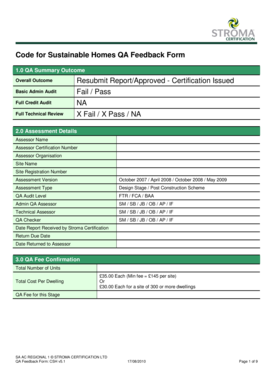
Get Qa Form - Stroma Login Page
How it works
-

Open form follow the instructions
-

Easily sign the form with your finger
-

Send filled & signed form or save
How to fill out the QA Form - Stroma Login Page online
Filling out the QA Form for the Stroma Login Page can seem daunting, but with a clear understanding of its components, the process can be straightforward. This guide will take you through each section of the form, ensuring you provide all the necessary information for a successful submission.
Follow the steps to complete the QA Form efficiently.
- Click ‘Get Form’ button to retrieve the QA Form and open it for editing.
- Begin by completing the QA Summary Outcome section. Indicate the overall outcome, whether it is a resubmit or approved status, alongside the results of the basic admin audit and full technical review.
- Fill in the Assessment Details. Here, you need to provide the assessor's name, certification number, organization, site name, and registration number. Also, specify the assessment version and type, as well as the date report was received and due for return.
- In the QA Fee Confirmation section, indicate the total number of units and the cost per dwelling, ensuring to select the correct fee applicable based on the number of units.
- Complete the Basic Administration Audit Outcome by confirming if all required key information has been provided and whether the report meets the presentation standards.
- Proceed to the BAA QA Feedback section. Indicate the result as pass or fail and provide any necessary comments regarding the outcome.
- For the Full Credit Audit / Full Technical Review section, detail any actions that have been taken to correct feedback for energy, water, materials, and other credit categories.
- After reviewing all sections, ensure to address any issues identified in the marking scheme, especially if a resubmission is required.
- Finally, save your changes, and consider downloading or printing a copy of the completed form for your records. You may also share the form as needed.
Complete the QA Form online today to ensure your submission is reviewed in a timely manner.
include all relevant facts • be written in the first person using an active voice • use the correct naming conventions • use the child or family's own words • use descriptions of what you saw and heard rather than conclusions • provide context to situations which could be misinterpreted • date all records and include ...
Industry-leading security and compliance
US Legal Forms protects your data by complying with industry-specific security standards.
-
In businnes since 199725+ years providing professional legal documents.
-
Accredited businessGuarantees that a business meets BBB accreditation standards in the US and Canada.
-
Secured by BraintreeValidated Level 1 PCI DSS compliant payment gateway that accepts most major credit and debit card brands from across the globe.