Loading
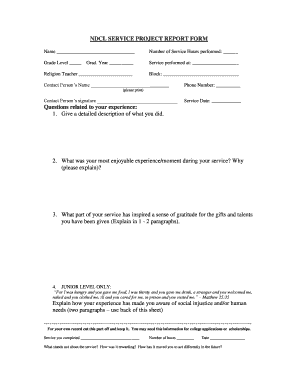
Get Ndcl Service Project Report Form - Eschoolview
How it works
-

Open form follow the instructions
-

Easily sign the form with your finger
-

Send filled & signed form or save
How to fill out the NDCL SERVICE PROJECT REPORT FORM - ESchoolView online
Completing the NDCL Service Project Report Form online is a straightforward process that allows you to document your service experience effectively. By following this guide, you will understand how to fill out each section accurately, ensuring your form is submitted correctly.
Follow the steps to complete the form online.
- Click ‘Get Form’ button to obtain the form and open it in the editor.
- Begin by entering your name in the designated field at the top of the form to identify yourself.
- Provide the total number of service hours you have performed in the appropriate field.
- Indicate your current grade level by selecting or entering the correct grade in the provided space.
- Fill in your graduation year to allow for tracking of your service performance over time.
- In the section labeled 'Service performed at,' write the name of the organization or location where you completed your service.
- Include the name of your religion teacher in the corresponding field.
- Specify your block by entering it in the designated area.
- Provide the contact person's name and ensure you enter their phone number accurately for any follow-up.
- Print the contact person's name and obtain their signature in the required section.
- Enter the service date in the provided space, making sure the date is accurate.
- Answer the questions regarding your service experience, including a detailed description of your activities and your most enjoyable moments.
- If applicable for junior level, respond to the question about social injustice and human needs based on your service experience.
- Once all sections are completed, review your responses to ensure accuracy and completeness.
- Save any changes you made to the form, and consider your options to download, print, or share your completed form.
Start filling out your NDCL Service Project Report Form online now to ensure your service is documented.
How to add a signature to a Google Form Find a signature app on Google Workspace Marketplace. the add-on to your workspace. Open the form in which you'd like to add a signature. Click the Add-ons section at top right. Select your e-signature add-on. Enable any necessary access permissions.
Industry-leading security and compliance
US Legal Forms protects your data by complying with industry-specific security standards.
-
In businnes since 199725+ years providing professional legal documents.
-
Accredited businessGuarantees that a business meets BBB accreditation standards in the US and Canada.
-
Secured by BraintreeValidated Level 1 PCI DSS compliant payment gateway that accepts most major credit and debit card brands from across the globe.