Loading
Get Product Change Notification Form
How it works
-

Open form follow the instructions
-

Easily sign the form with your finger
-

Send filled & signed form or save
How to fill out the Product Change Notification Form online
This guide aims to provide users with a detailed and supportive overview of how to complete the Product Change Notification Form online. By following the instructions, users will be able to navigate the process with confidence and accuracy.
Follow the steps to successfully fill out the form
- Click the ‘Get Form’ button to access the Product Change Notification Form and open it in your preferred online editor.
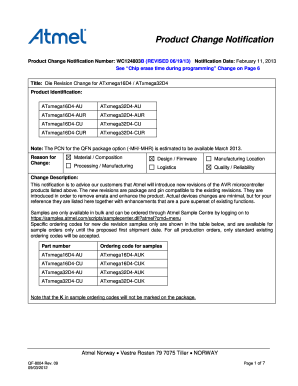
- Start by filling in the 'Product Identification' section. Enter the product identification numbers relevant to your notification, such as ATxmega16D4-AU or ATxmega32D4-AU, ensuring accuracy to avoid any errors in communication.
- Provide a clear 'Reason for Change'. Here, detail whether the change is due to material composition, design, manufacturing location, or other categories listed. This is crucial for customers to understand the implications of the change.
- In the 'Change Description' field, briefly outline the nature of the change, focusing on the enhancements and adjustments being made to existing products. This should be concise but informative.
- Complete the 'Changes' section, detailing the specific changes being made, such as modifications in power consumption levels or updates to detection protocols. This aids in transparency and helps customers prepare for the impact of these changes.
- Fill in the 'Identification Method to Distinguish Change' area with the new revision material ID if applicable. Accurate identification aids in tracking revisions and maintaining necessary records.
- In the 'Customer Acknowledgment of Receipt' section, enter your company, name, title, date, email address, location, and any comments you wish to include. This acknowledges receipt and should be submitted via email as indicated.
- Finally, review all entries for accuracy and completeness. Save changes, then download or print the completed form as necessary. Ensure to share it through proper channels to adhere to your company's processes.
Complete your Product Change Notification Form online today to ensure timely communication regarding product changes.
A product change notification (PCN) is a document issued by a manufacturer to inform customers about a change to a mass-produced product or its manufacturing process.
Industry-leading security and compliance
US Legal Forms protects your data by complying with industry-specific security standards.
-
In businnes since 199725+ years providing professional legal documents.
-
Accredited businessGuarantees that a business meets BBB accreditation standards in the US and Canada.
-
Secured by BraintreeValidated Level 1 PCI DSS compliant payment gateway that accepts most major credit and debit card brands from across the globe.