Loading
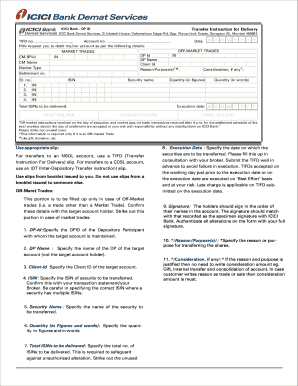
Get Aaswa Trading & Exports Ltd Form
How it works
-

Open form follow the instructions
-

Easily sign the form with your finger
-

Send filled & signed form or save
How to fill out the Aaswa Trading & Exports Ltd Form online
Filling out the Aaswa Trading & Exports Ltd Form online can streamline your document management process. This guide provides detailed, step-by-step instructions to help you complete the form accurately and efficiently.
Follow the steps to successfully complete the Aaswa Trading & Exports Ltd Form online.
- Click the ‘Get Form’ button to obtain the form and open it in the editor.
- Start by indicating the appropriate slip for the type of transfer. If transferring to an NSDL account, select the TIFD (Transfer Instruction For Delivery) slip; for transferring to a CDSL account, select the IDT (Inter-Depository Transfer instruction) slip. Ensure you are using slips from the booklet issued to you.
- If this is for Off-Market trades, complete the relevant section. Otherwise, strike it out. For Off-Market trades, specify the DP-Id where the target account is maintained.
- Provide the name of the Depository Participant associated with the target account.
- Input the Client ID of the target account.
- Indicate the ISIN of the security to be transferred. Confirm this in your transaction statement and be cautious of securities with multiple ISINs.
- Specify the name of the security being transferred.
- Enter the quantity of shares to be transferred both in figures and words.
- List the total number of ISINs to be delivered, striking out any unused spaces to prevent unauthorized alteration.
- Specify the execution date for the share transfer, consulting with your broker to fill this in appropriately. Timely submission of the TIFD is vital to prevent execution failures.
- All account holders should sign in the order their names appear on the account. Ensure signatures match those on record with your bank, authenticating any alterations with a full signature.
- Specify the reason or purpose for the share transfer.
- If applicable, mention any consideration amount. Note that if the transfer reason is classified as a gift or internal transfer, stating a consideration amount is not necessary.
Complete your documents online with confidence today!
How to Create an Invoice in Word from Scratch Step 1: Open a New Blank Document. ... Step 2: Create a Header. ... Step 3: Add Invoice Payment Due Date & Invoice Number. ... Step 4: Enter the Client's Contact Information. ... Step 5: Create an Itemized List of Services and Products. ... Step 6: Include Additional Payment Terms or Notes.