Loading
Get Smartlease Protect
How it works
-

Open form follow the instructions
-

Easily sign the form with your finger
-

Send filled & signed form or save
How to fill out the Smartlease Protect online
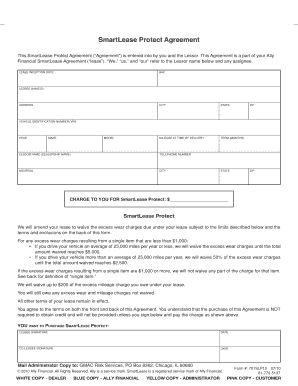
Filling out the Smartlease Protect form is an important step in ensuring that you have the necessary coverage for excess wear and mileage charges on your lease. This guide will walk you through each section of the form, providing you with clear and concise instructions.
Follow the steps to successfully complete the Smartlease Protect form.
- Click ‘Get Form’ button to obtain the Smartlease Protect form and open it for editing.
- Begin by entering the lease inception date. This is the date your lease agreement officially starts.
- Next, fill in the BAC (Business Activity Code), which categorizes the nature of your lease.
- Indicate the lessee names in the section designated for this purpose.
- Provide your current address, including street address, city, state, and zip code.
- Record the mileage on the vehicle at the time of delivery.
- Specify the term of your lease in months.
- Enter the vehicle identification number (VIN), which uniquely identifies your vehicle.
- Fill in details of the vehicle including the year, make, and model.
- Provide the lessor name (dealership name) and their contact telephone number.
- Repeat the address entry for the lessor, including city, state, and zip code.
- Indicate the charge to you for Smartlease Protect in the appropriate field.
- Read the terms related to Smartlease Protect, ensuring you understand the coverage details.
- To agree to purchase Smartlease Protect, sign in the lessee signature section and date it. If applicable, the co-lessee should sign and date as well.
- Once you have filled out all sections, review your information for accuracy.
- You may now save your changes, download, print, or share the completed form as needed.
Complete your Smartlease Protect form online today to ensure your coverage!
That's where a vehicle service contract (VSC) can help bridge the gap. By purchasing a VSC (similar to an extended auto warranty) you can help protect yourself from the costs of unexpected repairs. This extra coverage is often offered when purchasing a new vehicle but can be a good fit for older vehicles as well.