We use cookies to improve security, personalize the user experience, enhance our marketing activities (including cooperating with our marketing partners) and for other business use.
Click "here" to read our Cookie Policy. By clicking "Accept" you agree to the use of cookies. Read less
Read more
Accept
Loading
Form preview
  • US Legal Forms
  • Form Library
  • More Forms
  • More Uncategorized Forms
  • Supplemental Application Form - State Compensation Insurance Fund

Get Supplemental Application Form - State Compensation Insurance Fund

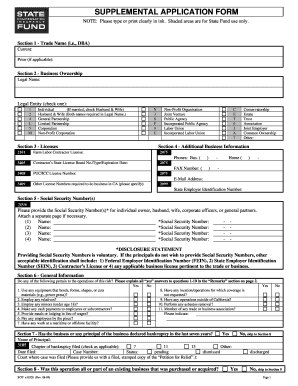
SUPPLEMENTAL APPLICATION FORM NOTE: Please type or print clearly in ink. Shaded areas are for State Fund use only. Section 1 - Trade Name (i.e., DBA) Current: Prior (if applicable): Section 2 - Business.

How it works

  1. Open form

    Open form follow the instructions

  2. Easily sign form

    Easily sign the form with your finger

  3. Share form

    Send filled & signed form or save

How to fill out the Supplemental Application Form - State Compensation Insurance Fund online

Completing the Supplemental Application Form for the State Compensation Insurance Fund can seem daunting, but with the right guidance, you can navigate it smoothly. This guide will provide you with clear, step-by-step instructions to help you fill out each section of the form online.

Follow the steps to complete the form accurately.

  1. Click ‘Get Form’ button to obtain the Supplemental Application Form and open it in your editor.
  2. In Section 1, enter your current trade name, if applicable, along with any prior trade name you may have used.
  3. In Section 2, provide the legal name of the business and select the legal entity type that applies to your situation by checking the appropriate box.
  4. Complete Section 3 by listing any licenses that your business holds, including additional licenses required to operate in California.
  5. Fill in Section 4 with relevant additional business information including your Farm Labor Contractor License or Contractor’s State License Board Number.
  6. In Section 5, provide Social Security Numbers for individuals associated with the business. If you prefer not to disclose these numbers, note the alternative identification options available.
  7. Review Section 6, answering questions about your business operations. Be sure to explain any 'yes' answers in the remarks section.
  8. In Section 7, declare if the business or any principal has declared bankruptcy in the last seven years, providing necessary details.
  9. Proceed to Section 8 to indicate if the operation was part of an existing business that was acquired, revealing percentage acquired and previous ownership details.
  10. Section 9 focuses on management practices. Indicate offered programs and practices in place regarding employee support, hiring, and safety.
  11. Utilize Section 10 for any remarks that you wish to add regarding your application.
  12. Complete Section 11 if this is a brokered account. The broker must fill in their details, affirming that the information provided is accurate and original signatures should be submitted.
  13. Once you have filled out all the relevant sections, save the changes, and choose to download, print, or share the form as needed.

Complete your Supplemental Application Form online today to ensure your business is properly covered.

Get form

Experience a faster way to fill out and sign forms on the web. Access the most extensive library of templates available.
Get form

Related content

DWC Forms - California Department of Industrial...
Supplemental job displacement non-transferable voucher * Injuries occurring on or after...
Learn more
Frequent Questions | University of Texas System
Who will be handling my Workers' Compensation Insurance claim? ... What is the Employer's...
Learn more
BMI Agent Quick Reference Guide - UserManual.wiki
Sponsorships COMPLETE COVERAGE • Workers' Compensation ... Claims Mailing Address...
Learn more

Related links form

Show Cause Notice To Contractor For Non Performance REQUEST FOR STATEMENT OF INTEREST - Idaho Transportation ... - Itd Idaho Idaho Adopt A Highway Heyburn State Park Cottage Rental Agreement - Idaho State Parks ... - Parksandrecreation Idaho

Questions & Answers

Get answers to your most pressing questions about US Legal Forms API.

Contact support

Right-click on the link and select the option to edit the link. In the Edit Hyperlink window, delete the current text in the “Text to display” field and type in the new name you want to use for the link. Click the “OK” button to save the changes and close the Edit Hyperlink window.

To include a link in any text message, just type or paste the full URL into your text. Most messaging platforms automatically turn the URL into a link allowing contacts to click and access the linked page.

Change an existing hyperlink Right-click anywhere on the link and, on the shortcut menu, click Edit Hyperlink. In the Edit Hyperlink dialog, select the text in the Text to display box. Type the text you want to use for the link, and then click OK.

All you have to do is select the link you want to edit, right-click on the link and select “Edit link” from the menu that appears, type in the new name you want to use for the link, and press “OK” to save the changes.

If you want to edit the title of the link on iOS, it is a little trickier, because if you tap it, you go to the link. To edit the text, tap and hold outside the link, and slide your finger into the point where you want the cursor. Then just edit normally.

0:11 1:23 How to Create Hyperlinks - YouTube YouTube Start of suggested clip End of suggested clip The search box you can begin typing the title of the page or post you would like to link to and aMoreThe search box you can begin typing the title of the page or post you would like to link to and a list of pages will populate. For you to select from.

<a href=” “> helps one to specify the target. This is followed by adding the text that is clickable in HTML. For example, in the above example, https://testbook.com/ is the link that is attached to the text “Testbook website page”. Finally, to finish it, you can add the </a> tag to indicate where the link ends.

To rename a URL as a short and relevant link name, you can use URL redirection. URL redirection is the process of forwarding one URL to another, using a redirect code. This allows you to create a short and memorable URL that redirects to the original long URL.

Get This Form Now!

Use professional pre-built templates to fill in and sign documents online faster. Get access to thousands of forms.
Get form
If you believe that this page should be taken down, please follow our DMCA take down processhere.

Industry-leading security and compliance

US Legal Forms protects your data by complying with industry-specific security standards.
  • In businnes since 1997
    25+ years providing professional legal documents.
  • Accredited business
    Guarantees that a business meets BBB accreditation standards in the US and Canada.
  • Secured by Braintree
    Validated Level 1 PCI DSS compliant payment gateway that accepts most major credit and debit card brands from across the globe.
Get Supplemental Application Form - State Compensation Insurance Fund
Get form
Form Packages
Adoption
Bankruptcy
Contractors
Divorce
Home Sales
Employment
Identity Theft
Incorporation
Landlord Tenant
Living Trust
Name Change
Personal Planning
Small Business
Wills & Estates
Packages A-Z
Form Categories
Affidavits
Bankruptcy
Bill of Sale
Corporate - LLC
Divorce
Employment
Identity Theft
Internet Technology
Landlord Tenant
Living Wills
Name Change
Power of Attorney
Real Estate
Small Estates
Wills
All Forms
Forms A-Z
Form Library
Customer Service
Terms of Service
Privacy Notice
Legal Hub
Content Takedown Policy
Bug Bounty Program
About Us
Help Portal
Legal Resources
Blog
Affiliates
Contact Us
Delete My Account
Site Map
Industries
Forms in Spanish
Localized Forms
State-specific Forms
Forms Kit
Legal Guides
Real Estate Handbook
All Guides
Prepared for You
Notarize
Incorporation services
Our Customers
For Consumers
For Small Business
For Attorneys
Our Sites
US Legal Forms
USLegal
FormsPass
pdfFiller
signNow
airSlate WorkFlow
DocHub
Instapage
Social Media
Call us now toll free:
+1 833 426 79 33
As seen in:
  • USA Today logo picture
  • CBC News logo picture
  • LA Times logo picture
  • The Washington Post logo picture
  • AP logo picture
  • Forbes logo picture
© Copyright 1997-2025
airSlate Legal Forms, Inc.
3720 Flowood Dr, Flowood, Mississippi 39232
Form Packages
Adoption
Bankruptcy
Contractors
Divorce
Home Sales
Employment
Identity Theft
Incorporation
Landlord Tenant
Living Trust
Name Change
Personal Planning
Small Business
Wills & Estates
Packages A-Z
Form Categories
Affidavits
Bankruptcy
Bill of Sale
Corporate - LLC
Divorce
Employment
Identity Theft
Internet Technology
Landlord Tenant
Living Wills
Name Change
Power of Attorney
Real Estate
Small Estates
Wills
All Forms
Forms A-Z
Form Library
Customer Service
Terms of Service
Privacy Notice
Legal Hub
Content Takedown Policy
Bug Bounty Program
About Us
Help Portal
Legal Resources
Blog
Affiliates
Contact Us
Delete My Account
Site Map
Industries
Forms in Spanish
Localized Forms
State-specific Forms
Forms Kit
Legal Guides
Real Estate Handbook
All Guides
Prepared for You
Notarize
Incorporation services
Our Customers
For Consumers
For Small Business
For Attorneys
Our Sites
US Legal Forms
USLegal
FormsPass
pdfFiller
signNow
airSlate WorkFlow
DocHub
Instapage
Social Media
Call us now toll free:
+1 833 426 79 33
As seen in:
  • USA Today logo picture
  • CBC News logo picture
  • LA Times logo picture
  • The Washington Post logo picture
  • AP logo picture
  • Forbes logo picture
© Copyright 1997-2025
airSlate Legal Forms, Inc.
3720 Flowood Dr, Flowood, Mississippi 39232