Loading
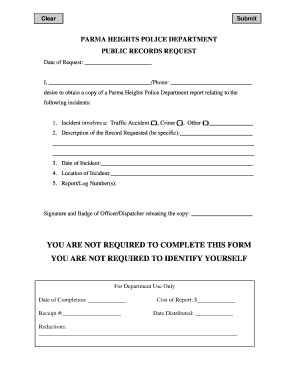
Get Public Records Request Form - Parma Heights
How it works
-

Open form follow the instructions
-

Easily sign the form with your finger
-

Send filled & signed form or save
How to fill out the Public Records Request Form - Parma Heights online
Filing a public records request can help you obtain important information from the Parma Heights Police Department. This guide will provide you with a clear, step-by-step approach to filling out the Public Records Request Form accurately and efficiently.
Follow the steps to complete your public records request form.
- Press the ‘Get Form’ button to access the Public Records Request Form. This will allow you to open the document in an editor of your choice.
- Fill in the 'Date of Request' field with the current date to indicate when you are submitting the request.
- In the space provided for your name, enter your full name. Include your phone number next to your name for further communication if necessary.
- Indicate the type of incident by checking the applicable box for 'Traffic Accident,' 'Crime,' or 'Other.' If you select 'Other,' provide a brief description of the incident in the space provided.
- Describe the record you are requesting in the designated area. Be as specific as possible to help the department locate the appropriate documents.
- Enter the date of the incident in the corresponding field. This information will assist in identifying the records you seek.
- Provide the location of the incident. This should include details such as the street name or address where the incident occurred.
- If you have a report or log number associated with the incident, include it in the respective section to further enhance your request.
- Review the completed form for accuracy. Once satisfied, you can save your changes, download the form, print it for your records, or share it as needed.
Complete your public records request online today and ensure your voice is heard!
(A) No person shall cause, create, or contribute in any way to noise, including but not limited to, playing a radio or other electronically amplified device, or a musical instrument, or operating a motorized generator in any way that disturbs the peace and quiet of other persons, in any manner in any area administered ...