Loading
Get Electrical Customer Form
How it works
-

Open form follow the instructions
-

Easily sign the form with your finger
-

Send filled & signed form or save
How to fill out the Electrical Customer Form online
Filling out the Electrical Customer Form online can streamline the process of establishing your account with the Electrical Safety Authority. This guide will walk you through each section of the form, ensuring you provide all necessary information accurately and efficiently.
Follow the steps to complete the form effectively.
- Press the ‘Get Form’ button to access the Electrical Customer Form and open it in your editing interface.
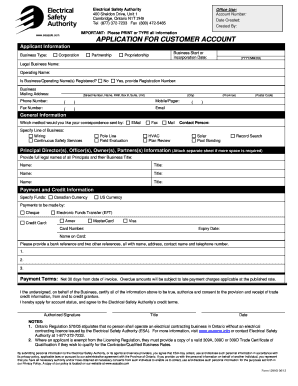
- Begin by filling out the Applicant Information section. Indicate your business type by selecting from the available options: Corporation, Partnership, or Proprietorship. Enter the business start or incorporation date in the required format (YYYY/MM/DD). Provide both the legal business name and the operating name if applicable. If your business or operating names are registered, select 'Yes' and include the registration number.
- In the Business Mailing Address section, enter the complete address including street number, street name, city, province, and postal code. Also include the primary phone number, mobile or pager number, and fax number if available.
- Provide your email address in the designated field. This is important for receiving correspondence related to your application.
- In the General Information section, select how you would like to receive correspondence (Email, Fax, Mail). Specify your line of business from the options listed.
- Detail the contact person for your application. Include their full name and title to ensure clear communication.
- Fill out the Principal Director(s), Officer(s), Owner(s), Partner(s) Information section by providing the full legal names and business titles of all principals involved. If more space is needed, attach a separate sheet.
- In the Payment and Credit Information section, specify the currency for transactions (Canadian or US currency). Indicate your preferred method of payment (Cheque, Electronic Funds Transfer, Credit Card). If using a credit card, include the card number, expiration date, and the name on the card.
- List your bank reference and two other references, ensuring to include their names, addresses, contact names, and phone numbers.
- Review the Payment Terms. By signing the document, you certify the accuracy of the information provided and agree to the terms outlined by the Electrical Safety Authority.
- Finally, add your authorized signature, include your title, and date the application. Ensure all information is clear and complete.
- Once all sections are completed, you can save changes, download the completed form, print it, or share it as necessary.
Start filling out your Electrical Customer Form online today to expedite your application process.
The target market for electricians includes anyone who needs electrical work done in their home, garden or business location. The market includes homeowners, businesses, factories, stores, landlords, rental property managers, industrial companies, and owners of electrical equipment.