Loading
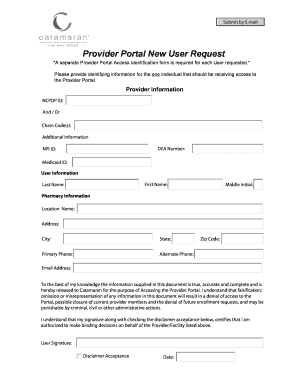
Get Provider Portal New User Request - Catamaran
How it works
-

Open form follow the instructions
-

Easily sign the form with your finger
-

Send filled & signed form or save
How to fill out the Provider Portal New User Request - Catamaran online
Filling out the Provider Portal New User Request form is a crucial step for individuals seeking access to important resources. This guide will provide you with detailed, step-by-step instructions to help you complete the form efficiently and accurately.
Follow the steps to successfully fill out the form.
- Click the ‘Get Form’ button to access the form and open it in the corresponding editor.
- In the Provider Information section, enter the NCPDP ID or Chain Code(s) relevant to the Provider. Additionally, if applicable, fill in the DEA Number, NPI ID, and Medicaid ID fields.
- Proceed to the User Information section. Input the first name, last name, and middle initial of the individual who will be receiving access to the Provider Portal.
- Navigate to the Pharmacy Information section. Fill in the location name, address, city, state, primary phone number, alternate phone number, and zip code.
- In the Email Address field, provide a valid email for communications related to the Provider Portal.
- Review the declaration statement regarding the accuracy of the information provided. Ensure that you understand the implications of falsifying information.
- Sign the document in the User Signature field, certifying your authorization to submit the request. Check the disclaimer acceptance box to confirm your acknowledgment of the terms.
- Finally, specify the date to indicate when the form is completed. After filling out all sections, you can save your changes, download a copy, print the document, or share it as needed.
Complete your Provider Portal New User Request online today for prompt access.