Loading
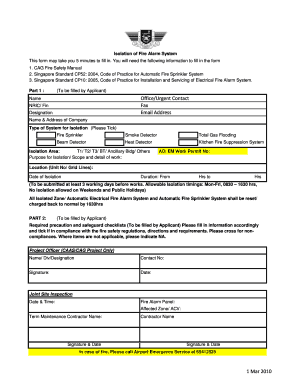
Get Code Of Practice Changi Airport Group Form
How it works
-

Open form follow the instructions
-

Easily sign the form with your finger
-

Send filled & signed form or save
How to fill out the Code Of Practice Changi Airport Group Form online
Filling out the Code Of Practice Changi Airport Group Form online is essential for ensuring compliance with fire safety regulations at Changi Airport. This guide provides comprehensive instructions to assist users through each section of the form effectively.
Follow the steps to complete the form accurately and efficiently.
- Press the ‘Get Form’ button to access the form and open it in your preferred digital platform.
- Begin with Part 1, where the applicant must fill in their name, NRIC/Fin number, designation, and the name and address of the company. Select the type of system for isolation by ticking the appropriate box.
- Indicate the isolation area by selecting T1, T2, T3, BT, Ancillary Building, or Others. Detail the purpose for isolation, ensuring to provide a thorough scope of work.
- Enter the AO/EM Work Permit number as required. Specify the location with unit numbers or grid lines, along with the date of isolation.
- Fill in the duration of isolation, specifying the start hour and end hour. Remember that this form must be submitted at least 3 working days before the planned works.
- Move to Part 2, where the applicant must complete the required precaution and safeguard checklists. Tick to confirm compliance with fire safety regulations or cross for non-compliance. Use 'NA' for items that do not apply.
- Provide details for the project officer, including their name, division, designation, and contact number, along with their signature and date.
- Schedule a joint site inspection and note down the date and time. Document the fire alarm panel information, affected zones, and the names and signatures of the term maintenance contractor.
- Fill in the confirmation and agreement section affirming compliance with the fire safety regulations. Include your name, NRIC number, and signature to certify the information provided is accurate.
- Once all parts of the form are completed, users may save changes, download, print, or share the form as required. Be sure to fax the completed form to the AES Fire Safety Unit using the provided contact number.
Complete your document online to ensure compliance and maintain safety standards.
The airport is operated by Changi Airport Group, a wholly-owned subsidiary under the purview of the Ministry of Finance of the Government of Singapore.
Industry-leading security and compliance
US Legal Forms protects your data by complying with industry-specific security standards.
-
In businnes since 199725+ years providing professional legal documents.
-
Accredited businessGuarantees that a business meets BBB accreditation standards in the US and Canada.
-
Secured by BraintreeValidated Level 1 PCI DSS compliant payment gateway that accepts most major credit and debit card brands from across the globe.