Loading
Get Pitch Count Log
How it works
-

Open form follow the instructions
-

Easily sign the form with your finger
-

Send filled & signed form or save
How to fill out the Pitch Count Log online
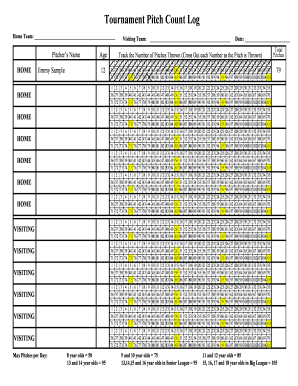
The Pitch Count Log is an essential document for tracking the number of pitches thrown by pitchers during games. This guide will help you navigate through the process of completing this form online with ease and accuracy.
Follow the steps to accurately complete the Pitch Count Log online.
- Press the ‘Get Form’ button to access the Pitch Count Log online and open it in your preferred online editor.
- Fill in the home team name in the designated area at the top of the form.
- Enter the name of the pitcher in the appropriate field, ensuring correct spelling.
- Record the date of the game by selecting or typing the correct date in the provided field.
- Indicate the age of the pitcher by selecting the correct age from the choices provided. This is crucial for ensuring compliance with pitching regulations.
- Begin to track the number of pitches thrown by crossing out each number in the sequence as pitches are thrown. You will find a numbered list from 1 to 105; ensure you accurately reflect the number of pitches thrown.
- After completing the pitch tracking, refer to the maximum pitch limits, noted on the form, to ensure the pitcher has not exceeded their allowed pitches based on their age group.
- Finally, review the completed form for accuracy. Once satisfied, you can save your changes, download a copy, or print the form for submission or record-keeping.
Start filling out your Pitch Count Log online today for efficient record-keeping!
Pitching 13 innings against the Boston Red Sox on June 14, 1974, Ryan threw 235 pitches, striking out 19, walking 10 and getting a no-decision. During a September 7, 1974 game against the Chicago White Sox at Anaheim Stadium, Ryan became the first Major League pitcher to have his pitch speed measured during a game.