Loading
Get Tjsb Bank Arn No Form
How it works
-

Open form follow the instructions
-

Easily sign the form with your finger
-

Send filled & signed form or save
How to fill out the Tjsb Bank Arn No Form online
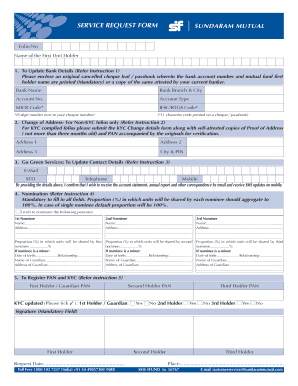
Filling out the Tjsb Bank Arn No Form online is a straightforward process designed to help you manage your banking and mutual fund details. This guide will provide you with clear and structured steps to successfully complete the form, ensuring all necessary information is accurately provided.
Follow the steps to fill out the form online:
- Click the ‘Get Form’ button to obtain the Tjsb Bank Arn No Form and open it for editing in your preferred digital format.
- Begin by entering your folio number and the name of the first unit holder at the top of the form.
- Section 1 allows you to update bank details. Fill in the bank name, branch and city, account number, account type, MICR code, and IFSC/RTGS code. Make sure to attach a cancelled cheque or bank statement as instructed.
- In Section 2, provided for changes of address for non-KYC folios, enter your new address details. Ensure that the address proof provided is not more than three months old.
- In Section 3, update your contact details by providing your email address and telephone numbers. Confirm your choice to receive communications via these channels.
- Fill out Section 4 for nominations. Provide the details for up to three nominees, including name, address, and the proportion of shares allocated to each nominee. Ensure to list guardians if any nominee is a minor.
- Complete Section 5 to register your PAN and KYC details. Enter the PAN for each holder and indicate if their KYC details are updated.
- Review all your entries for accuracy. Ensure mandatory fields are filled, particularly the signature section for the first holder.
- Once you have completed the form, save your changes, and proceed to download or print a copy for your records. You may also share the form as needed.
Start filling out your Tjsb Bank Arn No Form online today to manage your banking needs efficiently.
Please Apply for internet Banking at your Branch. Collect Internet Banking Login Id (Customer Number) from Branch. Customer has to generate Password on his own. Link/Menu for generating password is available on Login Page.