Loading
Get Eurofins Eaton Analytical
How it works
-

Open form follow the instructions
-

Easily sign the form with your finger
-

Send filled & signed form or save
How to fill out the Eurofins Eaton Analytical online
This guide provides a clear and supportive overview on how to effectively fill out the Eurofins Eaton Analytical form. Follow the provided steps to ensure that your submission is accurate and complete.
Follow the steps to fill out the Eurofins Eaton Analytical form online easily.
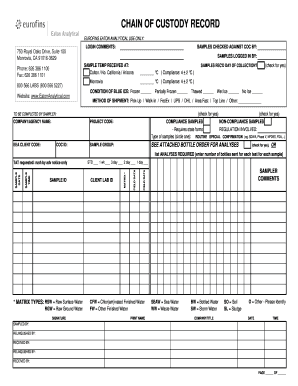
- Press the ‘Get Form’ button to acquire the form and display it in your chosen editing format.
- Begin by entering the relevant clients' information, including the EEA client code to identify your account.
- Input the project's specific codes, including the COC ID and Project Code to ensure traceability of samples.
- Indicate the condition of the ice used during shipment by checking the appropriate boxes such as Frozen, Thawed, Wet Ice, or No Ice.
- Specify the 'Method of Shipment' by selecting from options listed, including Pick-Up, Walk-In, FedEx, UPS, DHL, Area Fast or Top Line, or enter another method.
- Record the sample temperature upon receipt, ensuring it matches compliance standards (4 ± 2 °C).
- Indicate if the samples were received on the day of collection by checking the appropriate box.
- List the required analyses under the provided sections, specifying the number of bottles sent for each test for every sample.
- Complete the section for field data by entering sample ID, date, time sampled, and the name of the sampler.
- At the bottom of the form, ensure all signature fields for the sampler are completed and date fields are verified.
- Finally, save the completed form and utilize options to download, print, or share the document for submission.
Complete your Eurofins Eaton Analytical document online today.
In 1987, Eurofins was founded when Gilles Martin, the current Group CEO, purchased the rights to the ground-breaking testing technology SNIF-NMR® from the University of Nantes.