Loading
Form preview
  • US Legal Forms
  • Other Templates
  • More Forms
  • More Uncategorized Forms
  • Pinal County Alarm Permit

Get Pinal County Alarm Permit

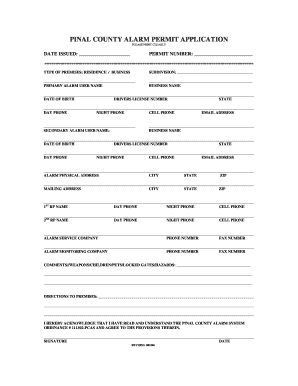
PINAL COUNTY ALARM PERMIT APPLICATION PLEASE PRINT CLEARLY DATE ISSUED: PERMIT NUMBER: TYPE OF PREMISES: RESIDENCE / BUSINESS SUBDIVISION: PRIMARY ALARM USER NAME BUSINESS NAME DATE OF BIRTH DRIVERS.

How it works

  1. Open form

    Open form follow the instructions

  2. Easily sign form

    Easily sign the form with your finger

  3. Share form

    Send filled & signed form or save

How to fill out the Pinal County Alarm Permit online

Filling out the Pinal County Alarm Permit online is a straightforward process that ensures your alarm system is registered with the appropriate authorities. This guide will walk you through each section of the permit, offering clear, step-by-step instructions to facilitate your application.

Follow the steps to successfully complete your permit application.

  1. Use the ‘Get Form’ button to access the permit application, which will open the form in an editing interface.
  2. Begin by clearly indicating the type of premises—either residence or business.
  3. Fill in the subdivision name if applicable, followed by the primary alarm user's name and business name.
  4. Provide the primary alarm user's date of birth, driver's license number, and the issuing state.
  5. Enter the primary user's contact information, including day phone, night phone, cell phone, and email address.
  6. Input the secondary alarm user's name and business name, along with their date of birth and driver's license information.
  7. Repeat the previous step for the secondary user's contact information.
  8. Complete the alarm physical address, including city, state, and ZIP code.
  9. Fill out the mailing address details, ensuring to include city, state, and ZIP code.
  10. Provide day, night, and cell phone details for the first responsible party (RP) by entering their name and contact details.
  11. Repeat for the second responsible party (RP) including their contact information.
  12. List the alarm service company name, along with their phone and fax numbers.
  13. Input the name of the alarm monitoring company and their corresponding phone and fax numbers.
  14. In the comments section, detail any relevant information regarding weapons, children, pets, locked gates, or hazards present at the premises.
  15. Provide clear directions to the premises, which will assist emergency responders.
  16. Read and acknowledge the Pinal County Alarm System Ordinance by signing and dating the form.
  17. Once all fields are complete, review the information for accuracy. You can then save changes, download, print, or share the filled-out permit.

Start your application today to ensure your alarm system is properly registered.

Get form

Experience a faster way to fill out and sign forms on the web. Access the most extensive library of templates available.
Get form

Related content

Alarm Unit - Pinal County
All security alarm users are required to obtain an Alarm Permit, which costs $18. These...
Learn more
Application For Alarm User Permit Sterling Il Gov...
ALARM USER PERMIT. APPLICATION City of Happy Valley For Office. Use Only: Permit #: PINAL...
Learn more
slm-5650 satellite modem installation and...
Oct 15, 2007 — Permits the user to fully configure the modem. Monitor. Permits the user...
Learn more

Related links form

Fundraising Form - Providence College - Providence Providence College Early Arrival Form Pizza Request Form - Providence College - Providence Trip Conditions Form - Providence College - Providence

Questions & Answers

Get answers to your most pressing questions about US Legal Forms API.

Contact support

Alarm permits are required for any active alarm system. Alarm permit fees are $10.00 per alarm function. Alarm systems may have two (2) functions that will require an alarm permit.

For any burglar alarm system not currently registered with us, you must complete and submit an Alarm Permit Registration Form, renew annually, and pay the appropriate fee. Renewal fee: $15 if the burglar alarm system had no false burglar alarms requiring police dispatch during the prior registration period.

How to quickly redact Phoenix alarm permit online Sign up and log in. Create a free account, set a strong password, and proceed with email verification to start managing your templates. Upload a document. ... Make changes to the template. ... Get your paperwork completed.

Alarm Permit For your convenience, the Office of Finance accepts on-line payments for alarm permits, or you can visit the Office of Finance at one of their branch locations. The cost for an alarm permit is $43. The cost to renew your alarm permit is $26.

A building permit is required for most non-residential construction, new homes, and when existing homes are remodeled or additions are made. The permit is issued when structures are designed in ance with the building codes and all other applicable codes and ordinances, to ensure the safety of the structure.

City of Phoenix Alarm System Ordinance Within the City of Phoenix, a permit is required for alarm systems monitored by an alarm company as well as those that are not. You may be subject to an assessment of $96.00 for each burglar alarm activation that the police respond to if you do not have the required permit.

A building permit is required for the construction, alteration, or repair of a patio cover/carport. Final inspection by the building safety department must be passed for the work to be considered completed by Maricopa County Planning & Development.

Get This Form Now!

Use professional pre-built templates to fill in and sign documents online faster. Get access to thousands of forms.
Get form
If you believe that this page should be taken down, please follow our DMCA take down processhere.
Get Pinal County Alarm Permit
Get form
  • Adoption
  • Bankruptcy
  • Contractors
  • Divorce
  • Home Sales
  • Employment
  • Identity Theft
  • Incorporation
  • Landlord Tenant
  • Living Trust
  • Name Change
  • Personal Planning
  • Small Business
  • Wills & Estates
  • Packages A-Z
  • Affidavits
  • Bankruptcy
  • Bill of Sale
  • Corporate - LLC
  • Divorce
  • Employment
  • Identity Theft
  • Internet Technology
  • Landlord Tenant
  • Living Wills
  • Name Change
  • Power of Attorney
  • Real Estate
  • Small Estates
  • Wills
  • All Forms
  • Forms A-Z
  • Other Templates
  • Legal Hub
  • About Us
  • Help Portal
  • Legal Resources
  • Blog
  • Affiliates
  • Contact Us
  • Delete My Account
  • Site Map
  • Industries
  • Forms in Spanish
  • Localized Forms
  • State-specific Forms
  • Forms Kit
  • Real Estate Handbook
  • All Guides
  • Notarize
  • Incorporation services
  • For Consumers
  • For Small Business
  • For Attorneys
  • USLegal
  • FormsPass
  • pdfFiller
  • signNow
  • altaFlow
  • DocHub
  • Instapage
Form Packages
  • Adoption
  • Bankruptcy
  • Contractors
  • Divorce
  • Home Sales
  • Employment
  • Identity Theft
  • Incorporation
  • Landlord Tenant
  • Living Trust
  • Name Change
  • Personal Planning
  • Small Business
  • Wills & Estates
  • Packages A-Z
Form Categories
  • Affidavits
  • Bankruptcy
  • Bill of Sale
  • Corporate - LLC
  • Divorce
  • Employment
  • Identity Theft
  • Internet Technology
  • Landlord Tenant
  • Living Wills
  • Name Change
  • Power of Attorney
  • Real Estate
  • Small Estates
  • Wills
  • All Forms
  • Forms A-Z
  • Other Templates
Customer Service
  • Legal Hub
  • About Us
  • Help Portal
  • Legal Resources
  • Blog
  • Affiliates
  • Contact Us
  • Delete My Account
  • Site Map
  • Industries
  • Forms in Spanish
  • Localized Forms
  • State-specific Forms
  • Forms Kit
Legal Guides
  • Real Estate Handbook
  • All Guides
Prepared for you
  • Notarize
  • Incorporation services
Our Customers
  • For Consumers
  • For Small Business
  • For Attorneys
Our Sites
  • USLegal
  • FormsPass
  • pdfFiller
  • signNow
  • altaFlow
  • DocHub
  • Instapage
Social Media
Call us now toll free:
+1 833 426 79 33
As seen in:
© Copyright 1999-2026 airSlate Legal Forms, Inc. 17 Station Street, Suite 303, Brookline, MA 02445
  • Your Privacy Choices
  • Terms of Service
  • Privacy Notice
  • Content Takedown Policy
  • Bug Bounty Program