Loading
Get Non Commercial Transaction Form
How it works
-

Open form follow the instructions
-

Easily sign the form with your finger
-

Send filled & signed form or save
How to fill out the Non Commercial Transaction Form online
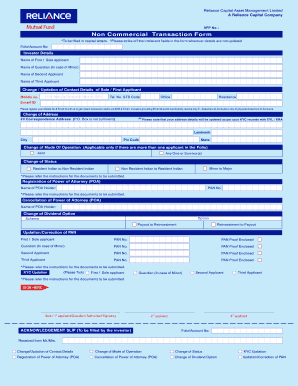
Filling out the Non Commercial Transaction Form online is a crucial step for managing your investment needs efficiently. This guide provides clear, step-by-step instructions tailored for all users, ensuring a smooth completion process.
Follow the steps to complete the Non Commercial Transaction Form online.
- Click ‘Get Form’ button to obtain the form and access it in the online editor.
- Fill in your Folio/Account Number to link it with your application. Ensure you enter this information correctly to avoid delays.
- Under the 'Investor Details' section, provide the names of all applicants as required. Be sure to enter the name of the first or sole applicant, and if applicable, the guardian for a minor.
- Update the contact details for the sole or first applicant. Enter a mobile number to receive transaction alerts via SMS, along with your email address for email alerts.
- If your address has changed, update your correspondence address. Provide the street address, city, state, pin code, and a landmark to ensure accurate delivery.
- Select the mode of operation if there are multiple applicants. Choose from options such as 'Joint' or 'Any One or Survivor(s)'.
- If applicable, indicate any changes in status, such as from 'Minor to Major' or changes as a Non Resident Indian.
- Provide the required information if you're registering or cancelling a Power of Attorney (POA), including the POA holder's name and PAN number.
- For any required corrections regarding your Permanent Account Number (PAN), ensure to fill out this section completely with the necessary proofs included.
- Tick the applicable KYC updation options. Be sure to check all necessary boxes corresponding to the applicants.
- Sign the form at the designated areas for each applicant to validate your application.
- Once you've completed the form, you can save changes, download, print, or share the form as needed.
Start completing your Non Commercial Transaction Form online today for a seamless investment management experience.
Procedure to Register Shop and Establishment Online Step 1: Visit the official website. The first step is to visit the state government's official website, where your business is located. ... Step 2: Create an account. ... Step 3: Fill in the application form. ... Step 4: Upload documents. ... Step 5: Pay the fee. ... Step 6: Wait for approval.