Loading
Get Bmi Royalty Assignment Verification Form Partial
How it works
-

Open form follow the instructions
-

Easily sign the form with your finger
-

Send filled & signed form or save
How to fill out the Bmi Royalty Assignment Verification Form Partial online
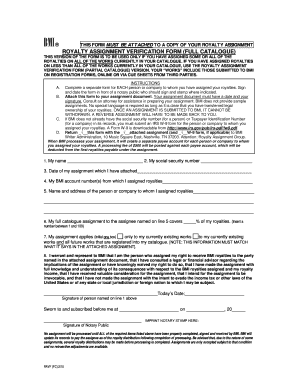
This guide provides step-by-step instructions to assist users in completing the Bmi Royalty Assignment Verification Form Partial online. By following these directions, you can ensure a smooth submission process for your royalty assignment.
Follow the steps to successfully complete the form online.
- Click 'Get Form' button to access the Bmi Royalty Assignment Verification Form Partial and display it in your selected editor.
- Begin by entering your name in the designated field at the start of the form. Make sure to provide your full legal name as it appears in official documents.
- Add your social security number in the appropriate section. This is crucial for Bmi’s record-keeping.
- Indicate the date of your assignment, which you must attach to this form. Ensure this date corresponds with the document you are submitting.
- Enter your Bmi account number(s) where you have assigned royalties. Double-check for accuracy to avoid processing delays.
- Provide the name and address of the person or company to whom you have assigned your royalties. Make sure this information is precise.
- In the next section, specify the percentage of your royalties being assigned. Input a number between 1 and 100 to denote how much of your royalties are included.
- Initial the box that describes whether your assignment applies only to existing works or includes all future works. Ensure your choice aligns with the attached assignment document.
- Review the warranty statement on the form and confirm your understanding. You will need to sign and date the form in front of a notary public, who will also sign and stamp the form.
- Ensure all elements are completed. Attach your assignment document and, if necessary, an IRS W-9 form for the assigned person or company. Save changes, then download, print, or share your completed form as needed.
Complete your Bmi Royalty Assignment Verification Form Partial online today for efficient processing.
BMI members can avoid any delay in receiving royalty payments by signing up for Direct Deposit to their bank account. Direct Deposit offers instant access to your royalty payments without the worry of waiting for checks to arrive, cashing them or misplacing them.
Industry-leading security and compliance
US Legal Forms protects your data by complying with industry-specific security standards.
-
In businnes since 199725+ years providing professional legal documents.
-
Accredited businessGuarantees that a business meets BBB accreditation standards in the US and Canada.
-
Secured by BraintreeValidated Level 1 PCI DSS compliant payment gateway that accepts most major credit and debit card brands from across the globe.