We use cookies to improve security, personalize the user experience, enhance our marketing activities (including cooperating with our marketing partners) and for other business use.
Click "here" to read our Cookie Policy. By clicking "Accept" you agree to the use of cookies. Read less
Read more
Accept
Loading
Form preview
  • US Legal Forms
  • Form Library
  • More Forms
  • More Uncategorized Forms
  • Affidavit Death Of Joint Tenant - Chicago Title

Get Affidavit Death Of Joint Tenant - Chicago Title

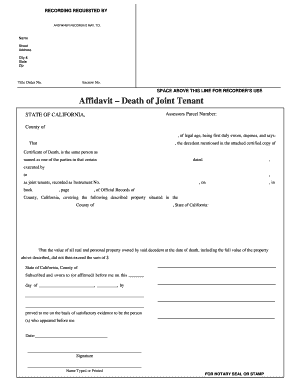
RECORDING REQUESTED BY Print This Form AND WHEN RECORDED MAIL TO: Name Street Address City & State Zip Title Order No. Escrow No. SPACE ABOVE THIS LINE FOR RECORDER S USE Affidavit Death of Joint.

How it works

  1. Open form

    Open form follow the instructions

  2. Easily sign form

    Easily sign the form with your finger

  3. Share form

    Send filled & signed form or save

How to fill out the Affidavit Death Of Joint Tenant - Chicago Title online

Completing the Affidavit Death Of Joint Tenant – Chicago Title online is an essential step for individuals managing the transfer of property ownership after the passing of a joint tenant. This guide will provide you with clear instructions to fill out the form with confidence.

Follow the steps to complete your affidavit accurately.

  1. Click ‘Get Form’ button to acquire the Affidavit Death Of Joint Tenant - Chicago Title form and open it in the online editor.
  2. At the top of the form, fill out the details for the recording request. This includes the name, street address, city, state, and zip code of the individual submitting the affidavit. Ensure that each piece of information is accurate to avoid processing delays.
  3. Enter the Title Order Number and Escrow Number in the designated fields. These numbers help maintain the organization and tracking of the property’s records.
  4. In the section labeled 'Affidavit – Death of Joint Tenant,' provide the Assessors Parcel Number. This number uniquely identifies the property in question and is crucial for record-keeping.
  5. Provide the name of the decedent in the space indicated, ensuring it matches exactly with the certified copy of the Certificate of Death attached to your form.
  6. Indicate the date of the document where the joint tenancy was established by filling in the relevant date information accurately. This ensures the record reflects the correct timeline.
  7. In the subsequent section, detail the full description of the property as stated in the recorded joint tenancy document. Include all necessary information for clarity.
  8. Complete the value section by stating the total value of all real and personal property owned by the decedent at the time of death. This figure must not exceed the sum indicated in California’s guidelines.
  9. Once all fields are filled, look for the area designated for the notary's confirmation. Fill this in as required, and ensure you've provided a signature and date.
  10. After reviewing the entire document for accuracy, save your changes. You can then download, print, or share the completed form as needed.

Start completing your Affidavit Death Of Joint Tenant online today!

Get form

Experience a faster way to fill out and sign forms on the web. Access the most extensive library of templates available.
Get form

Related content

Section 1010.150 Transferring Certificates of...
Upon the death of a vehicle owner, the procedure for transferring the vehicle ... on...
Learn more
Illinois Affidavit Death Joint Tenant |...
Dec 4, 2020 — remaxvn.com JOINT TENANCY AFFIDAVIT - ATGF Chicago Title Insurance Company...
Learn more
Matt Gaetz - Wikipedia
Matthew Louis Gaetz II is an American lawyer and politician serving as the U.S...
Learn more

Related links form

Nifc Forms Durango Interagency Dispatch Incident Organizer - Gacc Nifc EXHIBIT E -- Incident Blanket Purchase Agreement (I-BPA) Performance Evaluation Highlighted Blocks Operations And Safety Procedures Guide For Helicopter Pilots - Nifc

Questions & Answers

Get answers to your most pressing questions about US Legal Forms API.

Contact support

Answer: Headers and footers generally contain additional information such as page numbers, dates, an author's name, and footnotes, which can help keep longer documents organized and make them easier to read. Text entered in the header or footer will appear on each page of the document.

Headers and footers are the top and bottom sections of the document respectively. They are separate sections from the main document, and are often used to hold footnotes, page numbers, titles, and other information.

Headers and footers in Excel add a sense of organization to the soft documents. In Excel, we can add various options to be put up as header/footer text, such as “Date,” “Time,” “Sheet Name,” “File Name,” “Page Number,” “Custom Text,” etc.

Headers and footers generally contain additional information such as page numbers, dates, an author's name, and footnotes, which can help keep longer documents organized and make them easier to read. Text entered in the header or footer will appear on each page of the document.

Footers are located in the margin area at the bottom of a page. Headers and footers generally contain document information, such as the file name, author, date created, page numbering and the like. This information is repeated on each page and thus enables the reader to easily navigate the document.

The page header appears within the top margin of every page of the paper. For student papers, the page header consists of the page number only. For professional papers, the page header consists of the page number and running head.

A header is text that is placed at the top of a page, while a footer is placed at the bottom, or foot, of a page. Typically these areas are used for inserting document information, such as the name of the document, the chapter heading, page numbers, creation date and the like.

A header or heading is text at the top of a page in an electronic document or hard copy. For example, in Microsoft Word, a header could be created in a document to display the page number of each page. By contrast, a footer is at the bottom of a page in an electronic document or hard copy.

A header is a term given to a main strip or icon that sits towards the top of your website. Its purpose is to introduce your branding and send out a message. Headers usually appear on every single page of your website, though they can vary in placement if required.

Get This Form Now!

Use professional pre-built templates to fill in and sign documents online faster. Get access to thousands of forms.
Get form
If you believe that this page should be taken down, please follow our DMCA take down processhere.

Industry-leading security and compliance

US Legal Forms protects your data by complying with industry-specific security standards.
  • In businnes since 1997
    25+ years providing professional legal documents.
  • Accredited business
    Guarantees that a business meets BBB accreditation standards in the US and Canada.
  • Secured by Braintree
    Validated Level 1 PCI DSS compliant payment gateway that accepts most major credit and debit card brands from across the globe.
Get Affidavit Death Of Joint Tenant - Chicago Title
Get form
Form Packages
Adoption
Bankruptcy
Contractors
Divorce
Home Sales
Employment
Identity Theft
Incorporation
Landlord Tenant
Living Trust
Name Change
Personal Planning
Small Business
Wills & Estates
Packages A-Z
Form Categories
Affidavits
Bankruptcy
Bill of Sale
Corporate - LLC
Divorce
Employment
Identity Theft
Internet Technology
Landlord Tenant
Living Wills
Name Change
Power of Attorney
Real Estate
Small Estates
Wills
All Forms
Forms A-Z
Form Library
Customer Service
Terms of Service
Privacy Notice
Legal Hub
Content Takedown Policy
Bug Bounty Program
About Us
Blog
Affiliates
Contact Us
Delete My Account
Site Map
Industries
Forms in Spanish
Localized Forms
State-specific Forms
Forms Kit
Legal Guides
Real Estate Handbook
All Guides
Prepared for You
Notarize
Incorporation services
Our Customers
For Consumers
For Small Business
For Attorneys
Our Sites
US Legal Forms
USLegal
FormsPass
pdfFiller
signNow
airSlate WorkFlow
DocHub
Instapage
Social Media
Call us now toll free:
+1 833 426 79 33
As seen in:
  • USA Today logo picture
  • CBC News logo picture
  • LA Times logo picture
  • The Washington Post logo picture
  • AP logo picture
  • Forbes logo picture
© Copyright 1997-2025
airSlate Legal Forms, Inc.
3720 Flowood Dr, Flowood, Mississippi 39232
Form Packages
Adoption
Bankruptcy
Contractors
Divorce
Home Sales
Employment
Identity Theft
Incorporation
Landlord Tenant
Living Trust
Name Change
Personal Planning
Small Business
Wills & Estates
Packages A-Z
Form Categories
Affidavits
Bankruptcy
Bill of Sale
Corporate - LLC
Divorce
Employment
Identity Theft
Internet Technology
Landlord Tenant
Living Wills
Name Change
Power of Attorney
Real Estate
Small Estates
Wills
All Forms
Forms A-Z
Form Library
Customer Service
Terms of Service
Privacy Notice
Legal Hub
Content Takedown Policy
Bug Bounty Program
About Us
Blog
Affiliates
Contact Us
Delete My Account
Site Map
Industries
Forms in Spanish
Localized Forms
State-specific Forms
Forms Kit
Legal Guides
Real Estate Handbook
All Guides
Prepared for You
Notarize
Incorporation services
Our Customers
For Consumers
For Small Business
For Attorneys
Our Sites
US Legal Forms
USLegal
FormsPass
pdfFiller
signNow
airSlate WorkFlow
DocHub
Instapage
Social Media
Call us now toll free:
+1 833 426 79 33
As seen in:
  • USA Today logo picture
  • CBC News logo picture
  • LA Times logo picture
  • The Washington Post logo picture
  • AP logo picture
  • Forbes logo picture
© Copyright 1997-2025
airSlate Legal Forms, Inc.
3720 Flowood Dr, Flowood, Mississippi 39232