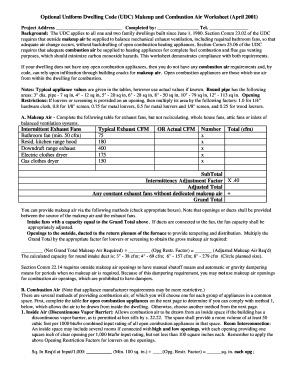
Get Makeup And Combustion Air Worksheet - Bpermitb Path
How it works
-

Open form follow the instructions
-

Easily sign the form with your finger
-

Send filled & signed form or save
How to fill out the Makeup And Combustion Air Worksheet - BPermitb Path online
Filling out the Makeup And Combustion Air Worksheet is essential for ensuring compliance with ventilation and combustion air requirements in dwellings. This guide provides step-by-step instructions for effectively completing the form online.
Follow the steps to successfully complete the Makeup And Combustion Air Worksheet.
- Click ‘Get Form’ button to access the Makeup And Combustion Air Worksheet and open it in the online editor.
- Begin by entering the project address in the designated field at the top of the form.
- Complete the 'Completed by' section by entering your name and contact number in the appropriate spaces.
- In the Makeup Air section, fill out the table for intermittent exhaust fans. Enter actual CFM values where applicable or use typical values provided in the form.
- Calculate the subtotal for intermittent exhaust fans by adding up the CFM figures entered. Apply the intermittency adjustment factor to determine the adjusted total.
- Indicate the method of providing makeup air by checking the appropriate boxes. Be sure to note any required adjustments for duct sizes and openings.
- Move to the Combustion Air section and complete the table for open combustion appliances. Ensure that the combined input ratings meet the specified requirements.
- Select the method for providing combustion air based on the room's characteristics, referring to the listed options (e.g., inside air, outside air).
- For any method selected, accurately calculate the required openings and duct sizes, applying any necessary reduction factors as indicated in the form.
- Review all data entered for accuracy, then choose to save changes, download, print, or share the worksheet as needed.
Start completing the Makeup And Combustion Air Worksheet online to ensure proper compliance with ventilation regulations.
2:29 7:38 Writing Math Equations in Microsoft Word - YouTube YouTube Start of suggested clip End of suggested clip Using words embedded equation editor so to find Microsoft words equation editor you go to the insertMoreUsing words embedded equation editor so to find Microsoft words equation editor you go to the insert tab on the on the ribbon let's bring this a little higher. So here's the insert tab. And notice on