Get West Covina Bruins
How it works
-

Open form follow the instructions
-

Easily sign the form with your finger
-

Send filled & signed form or save
How to fill out the West Covina Bruins online
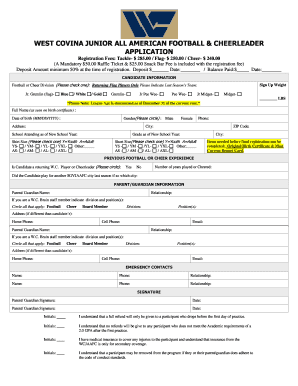
Filling out the West Covina Bruins application is a straightforward process that allows participants to register for youth football and cheerleading. This guide provides step-by-step instructions to help you navigate each section of the application with ease.
Follow the steps to complete your application successfully.
- Press the ‘Get Form’ button to access the application and open it for editing.
- Begin with the candidate information section. Indicate the football or cheer division by checking the appropriate box. If applicable, specify the last season’s team for returning flag players.
- Provide the candidate’s full name as it appears on their birth certificate, select their gender, and enter their date of birth in MM/DD/YYYY format.
- Fill in the candidate's address, including city, ZIP code, and school attending for the new school year. Also, indicate their grade for the upcoming school year.
- Select the appropriate shirt size and short size by checking one from the provided options.
- Ensure you have the required documents ready for final registration, including the original birth certificate and the most current report card.
- Proceed to the previous football or cheer experience section. Indicate if the candidate is a returning player or cheerleader and provide the number of years they have participated.
- If the candidate played for another city last season, specify which city they played for.
- Complete the parent/guardian information section. Provide names, relationships to the candidate, and contact methods including home phone, cell phone, and email.
- Fill in emergency contact details by providing names, phone numbers, and relationships for two emergency contacts.
- Sign and date the signature section. Ensure initials are provided where necessary to indicate understanding of policies regarding refunds, insurance, and code of conduct.
- Once all fields are completed, review the application for accuracy, save your changes, and proceed to download, print, or share your completed form.
Complete your application online today and ensure a spot for your child in the West Covina Bruins program!
0:18 1:03 How to Create Bulleted Lists in Microsoft Word [Tutorial] - YouTube YouTube Start of suggested clip End of suggested clip And it would undo. It. So pretty straightforward process here guys do a positive to help you out andMoreAnd it would undo. It. So pretty straightforward process here guys do a positive to help you out and i do look forward to catching you all in the next tutorial goodbye.
Industry-leading security and compliance
-
In businnes since 199725+ years providing professional legal documents.
-
Accredited businessGuarantees that a business meets BBB accreditation standards in the US and Canada.
-
Secured by BraintreeValidated Level 1 PCI DSS compliant payment gateway that accepts most major credit and debit card brands from across the globe.