Loading
Get 48 Cfr52.227-11 - Patent Rights - Ownership By The Contractor ...
How it works
-

Open form follow the instructions
-

Easily sign the form with your finger
-

Send filled & signed form or save
How to fill out the 48 CFR52.227-11 - Patent Rights - Ownership By The Contractor online
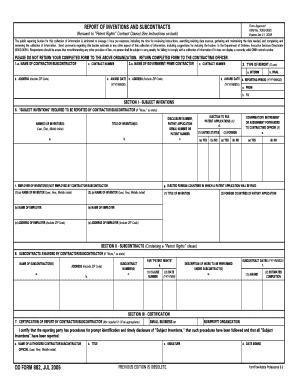
Filling out the 48 CFR52.227-11 form is essential for contractors and subcontractors to report inventions and subcontract awards that contain a 'Patent Rights' clause. This guide will provide you with clear, step-by-step instructions to help you complete this form accurately and efficiently.
Follow the steps to complete the form effectively.
- Click the ‘Get Form’ button to download the form and open it in your preferred PDF editor.
- Begin by filling out the section regarding contractor information. You will need to provide the name of the contractor or subcontractor in field 1.a.
- In field 2.a, enter the name of the government prime contractor. If it is the same as the contractor, simply state 'same'.
- Provide the contract number in field 2.c. If it is the same as field 1.c, state 'same'.
- Select the type of report in section 3 by marking either 'Interim' or 'Final'.
- Complete fields for the reporting period. Enter the dates in the proper format (YYYYMMDD) for both start and end dates.
- In SECTION I, list all 'Subject Inventions' that need reporting, including the names of inventors and titles of inventions.
- Specify the disclosure number, patent application serial number, or patent number in field 5.c.
- Indicate if you elect to file patent applications in the United States and in foreign countries by marking 'Yes' or 'No'.
- Provide information about the employer of each inventor not employed by the contractor or subcontractor in section 5.f.
- In SECTION II, report on any subcontracts awarded by the contractor, including the name and address of subcontractors along with the subcontract number.
- For each subcontract, provide the description of work, dates, and any relevant Patent Rights clause information.
- In SECTION III, complete the certification of the report as needed, including your name, title, and signature.
- Once all sections are completed, review the form for accuracy. Save your changes, and prepare to download, print, or share the completed document as necessary.
Complete your 48 CFR52.227-11 form online to ensure you meet all necessary reporting requirements.
To transfer your current phone number to Spectrum Mobile, select Keep my phone number when placing your order. You'll then be asked to provide your account information from your previous carrier.
Industry-leading security and compliance
US Legal Forms protects your data by complying with industry-specific security standards.
-
In businnes since 199725+ years providing professional legal documents.
-
Accredited businessGuarantees that a business meets BBB accreditation standards in the US and Canada.
-
Secured by BraintreeValidated Level 1 PCI DSS compliant payment gateway that accepts most major credit and debit card brands from across the globe.