Loading
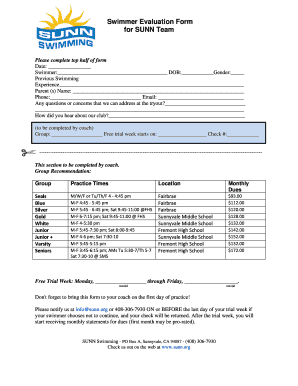
Get Swimmer Evaluation Form For Sunn Team - Teamunify
How it works
-

Open form follow the instructions
-

Easily sign the form with your finger
-

Send filled & signed form or save
How to fill out the Swimmer Evaluation Form For SUNN Team - TeamUnify online
Completing the Swimmer Evaluation Form for the SUNN Team is a crucial step in joining the team. This guide provides clear, step-by-step instructions to help you navigate the online form efficiently.
Follow the steps to accurately complete your evaluation form.
- Click the ‘Get Form’ button to access the Swimmer Evaluation Form and open it in your designated editor.
- In the top half of the form, enter the current date in the specified format.
- Detail any previous swimming experience in the designated area to help coaches understand the swimmer's background.
- Fill in the parent or guardian's name, contact phone number, and email address for effective communication.
- Address any questions or concerns that may arise during the tryout period in the provided space.
- Indicate how you learned about the SUNN club in the appropriate field; this helps us with outreach initiatives.
- Leave the section labeled for coaching staff blank, as they will complete it based on their evaluation after the tryout.
- After completing the form, review all your entries for accuracy before proceeding to save changes, download, or print.
- Be sure to submit the completed form to your coach on the first day of practice.
Start filling out your swimmer evaluation form online today!
Industry-leading security and compliance
US Legal Forms protects your data by complying with industry-specific security standards.
-
In businnes since 199725+ years providing professional legal documents.
-
Accredited businessGuarantees that a business meets BBB accreditation standards in the US and Canada.
-
Secured by BraintreeValidated Level 1 PCI DSS compliant payment gateway that accepts most major credit and debit card brands from across the globe.