We use cookies to improve security, personalize the user experience, enhance our marketing activities (including cooperating with our marketing partners) and for other business use.
Click "here" to read our Cookie Policy. By clicking "Accept" you agree to the use of cookies. Read less
Read more
Accept
Loading
Form preview
  • US Legal Forms
  • Form Library
  • More Forms
  • More Uncategorized Forms
  • Anthem Overpayment Recovery

Get Anthem Overpayment Recovery

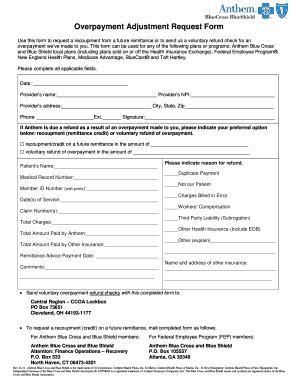
Overpayment Adjustment Request Form For Anthem Blue Cross and Blue Shield members, mail to: Anthem Blue Cross and Blue Shield Attention: Finance Operations Recovery P.O. Box 533 North Haven, CT 06473-4201.

How it works

  1. Open form

    Open form follow the instructions

  2. Easily sign form

    Easily sign the form with your finger

  3. Share form

    Send filled & signed form or save

How to fill out the Anthem Overpayment Recovery online

This guide provides clear and supportive instructions for completing the Anthem Overpayment Recovery form online. Whether you are requesting a recoupment or sending a voluntary refund check due to an overpayment, this guide will help you navigate each step effectively.

Follow the steps to complete your Anthem Overpayment Recovery form

  1. Click the ‘Get Form’ button to obtain the Anthem Overpayment Recovery form and open it for editing.
  2. Fill in the date at the top of the form to ensure accurate tracking of your request.
  3. Enter the provider’s name, including their NPI (National Provider Identifier) number. This identifies the provider associated with the overpayment.
  4. Complete the provider’s address, including city, state, and zip code, for accurate correspondence.
  5. Provide your phone number and extension, if applicable, to allow for direct communication regarding the request.
  6. Sign the document to confirm the information provided is accurate and true.
  7. Indicate your preferred option for the refund: either recoupment (credit on a future remittance) or a voluntary refund check.
  8. Fill in the specific amounts for the recoupment or voluntary refund as applicable.
  9. Enter the patient’s name and their medical record number for reference in your request.
  10. Provide the member ID number with the prefix, along with the date(s) of service related to the overpayment.
  11. Include the claim number(s) associated with the overpayment to ensure proper processing.
  12. List the total charges, total amount paid by Anthem, and any payments made by other insurance.
  13. Indicate the remittance advice payment date for additional clarity.
  14. Explain the reason for the refund by checking the appropriate box or providing additional details if necessary.
  15. If applicable, write comments for further clarification regarding your request.
  16. If there is other insurance involved, provide their name and address for processing.
  17. Once all fields have been completed, save your changes and proceed to download or print the form for submission.

Encourage others to manage their overpayment recovery requests easily online.

Get form

Experience a faster way to fill out and sign forms on the web. Access the most extensive library of templates available.
Get form

Related content

HHS/OIG-Audit--"Review of Anthem Blue Cross and...
Jun 21, 1999 — We recommend that Anthem adjust its Medicare accounts for the improper...
Learn more
Anthem Blue Cross Traditional Basic Plan - HR...
Keeping Anthem Blue Cross Traditional HMO After Your Coverage Status ... recoveries for...
Learn more
Affordable Care Act - Wikipedia
The Affordable Care Act (ACA), formally known as the Patient Protection and Affordable...
Learn more

Related links form

Collier County Public Schools Ein Form Heco Lvm Form City Of San Antonio Commercial Remodel Permit Application Desktop Appraisal Form

Questions & Answers

Get answers to your most pressing questions about US Legal Forms API.

Contact support

This means claims submitted on or after October 1, 2019 will be subject to a ninety (90) day timely filing requirement, and Anthem will refuse payment if submitted more than ninety (90) days after the date of service1. If you have any questions, please contact your local network representative.

ANTHEM is a registered trademark of Anthem Insurance Companies, Inc. The Blue Cross and Blue Shield names and symbols are registered marks of the Blue Cross and Blue Shield Association. Additional information about Anthem Blue Cross and Blue Shield in Ohio is available at .anthem.com.

You can also file a grievance by: Calling Member Services at 844-912-0938 (TTY 711). Logging into the secure member portal or the mobile app and finding Grievances under Support. Printing the form and emailing it to ohioga@anthem.com or faxing it to us at 866-587-3316.

Reasons for Anthem insurance claims denials include: The filing deadline has expired. The insured mad a late payment to COBRA. The medical device or treatment sought is not medically necessary.

You may file an appeal within 60 calendar days of the date on the letter we sent to tell you of our decision. You might be able to file an appeal even if 60 days have passed since we made our first decision. Tell us in your written request why you could not file within the 60 days allowed.

Anthem follows the standard of: • For participating providers — within the 180 day timely filing period. For nonparticipating providers — within the 365 day timely filing period.

Initial disputes must be submitted within 365 days, or the time specified in the provider's contract, whichever is greater, of Blue Shield's date of contest, denial, notice, or payment.

Select Claim Status Inquiry from the drop-down menu. Submit an inquiry and review the Claims Status Detail page. If the claim is denied or final, there will be an option to dispute the claim. Select Dispute the Claim to begin this process.

Get This Form Now!

Use professional pre-built templates to fill in and sign documents online faster. Get access to thousands of forms.
Get form
If you believe that this page should be taken down, please follow our DMCA take down processhere.

Industry-leading security and compliance

US Legal Forms protects your data by complying with industry-specific security standards.
  • In businnes since 1997
    25+ years providing professional legal documents.
  • Accredited business
    Guarantees that a business meets BBB accreditation standards in the US and Canada.
  • Secured by Braintree
    Validated Level 1 PCI DSS compliant payment gateway that accepts most major credit and debit card brands from across the globe.
Get Anthem Overpayment Recovery
Get form
Form Packages
Adoption
Bankruptcy
Contractors
Divorce
Home Sales
Employment
Identity Theft
Incorporation
Landlord Tenant
Living Trust
Name Change
Personal Planning
Small Business
Wills & Estates
Packages A-Z
Form Categories
Affidavits
Bankruptcy
Bill of Sale
Corporate - LLC
Divorce
Employment
Identity Theft
Internet Technology
Landlord Tenant
Living Wills
Name Change
Power of Attorney
Real Estate
Small Estates
Wills
All Forms
Forms A-Z
Form Library
Customer Service
Terms of Service
Privacy Notice
Legal Hub
Content Takedown Policy
Bug Bounty Program
About Us
Help Portal
Legal Resources
Blog
Affiliates
Contact Us
Delete My Account
Site Map
Industries
Forms in Spanish
Localized Forms
State-specific Forms
Forms Kit
Legal Guides
Real Estate Handbook
All Guides
Prepared for You
Notarize
Incorporation services
Our Customers
For Consumers
For Small Business
For Attorneys
Our Sites
US Legal Forms
USLegal
FormsPass
pdfFiller
signNow
airSlate WorkFlow
DocHub
Instapage
Social Media
Call us now toll free:
+1 833 426 79 33
As seen in:
  • USA Today logo picture
  • CBC News logo picture
  • LA Times logo picture
  • The Washington Post logo picture
  • AP logo picture
  • Forbes logo picture
© Copyright 1997-2025
airSlate Legal Forms, Inc.
3720 Flowood Dr, Flowood, Mississippi 39232
Form Packages
Adoption
Bankruptcy
Contractors
Divorce
Home Sales
Employment
Identity Theft
Incorporation
Landlord Tenant
Living Trust
Name Change
Personal Planning
Small Business
Wills & Estates
Packages A-Z
Form Categories
Affidavits
Bankruptcy
Bill of Sale
Corporate - LLC
Divorce
Employment
Identity Theft
Internet Technology
Landlord Tenant
Living Wills
Name Change
Power of Attorney
Real Estate
Small Estates
Wills
All Forms
Forms A-Z
Form Library
Customer Service
Terms of Service
Privacy Notice
Legal Hub
Content Takedown Policy
Bug Bounty Program
About Us
Help Portal
Legal Resources
Blog
Affiliates
Contact Us
Delete My Account
Site Map
Industries
Forms in Spanish
Localized Forms
State-specific Forms
Forms Kit
Legal Guides
Real Estate Handbook
All Guides
Prepared for You
Notarize
Incorporation services
Our Customers
For Consumers
For Small Business
For Attorneys
Our Sites
US Legal Forms
USLegal
FormsPass
pdfFiller
signNow
airSlate WorkFlow
DocHub
Instapage
Social Media
Call us now toll free:
+1 833 426 79 33
As seen in:
  • USA Today logo picture
  • CBC News logo picture
  • LA Times logo picture
  • The Washington Post logo picture
  • AP logo picture
  • Forbes logo picture
© Copyright 1997-2025
airSlate Legal Forms, Inc.
3720 Flowood Dr, Flowood, Mississippi 39232