Loading
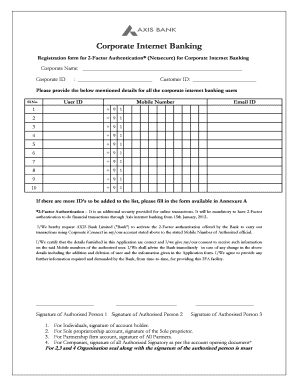
Get Axis Bank Netsecure Registration Form Pdf
How it works
-

Open form follow the instructions
-

Easily sign the form with your finger
-

Send filled & signed form or save
How to fill out the Axis Bank Netsecure Registration Form Pdf online
Filling out the Axis Bank Netsecure Registration Form Pdf is essential for activating two-factor authentication for corporate internet banking. This guide provides step-by-step instructions to ensure users can complete the form accurately and efficiently.
Follow the steps to complete your registration form successfully.
- Click ‘Get Form’ button to obtain the Axis Bank Netsecure Registration Form Pdf and open it in a suitable editor.
- Begin by filling in the 'Corporate Name' field at the top of the form. This should reflect the registered name of your corporate entity.
- In the section labeled for corporate internet banking users, sequentially enter the 'User ID' and 'Mobile Number' for each user listed. Ensure that the mobile numbers are accurate and in the correct format.
- If additional user IDs need to be added beyond the initial users, utilize the form provided in Annexure A, following the same instructions regarding user details.
- Review the consent statement at the bottom of the form. Confirm your agreement to the terms regarding the accuracy of the information provided and the process of notifying the bank of changes.
- Conclude by securing signatures from the authorized persons listed. Ensure that all required individuals sign the form as per the account type indicated.
- After completing the form, save your changes. You can download, print, or share the completed form as needed.
Ensure that all information is accurately filled and submit the Axis Bank Netsecure Registration Form Pdf online today.
Enter the activation code sent on your registered email id or mobile number, in the Netsecure app and press "Next". You will be prompted to send an SMS with predefined text. Please do not alter the SMS text. Now set your pin and press "OK".