Loading
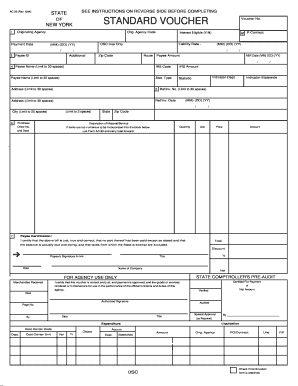
Get Nysdec Standard Voucher Form
How it works
-

Open form follow the instructions
-

Easily sign the form with your finger
-

Send filled & signed form or save
How to fill out the Nysdec Standard Voucher Form online
Completing the Nysdec Standard Voucher Form online is a straightforward process that ensures accurate and timely payment for services rendered. This guide provides clear instructions on filling out each section of the form to support you in this essential task.
Follow the steps to complete the Nysdec Standard Voucher Form effectively.
- Click the ‘Get Form’ button to access the Nysdec Standard Voucher Form and open it in your preferred online editor.
- Begin by entering the payment date in the specified format (MM/DD/YY). This date indicates when the payment is being processed.
- Fill in the originating agency code, which helps to identify the agency associated with the voucher's request.
- Include the P-contract number if applicable. Indicate whether the payment is interest eligible by selecting 'Y' for yes or 'N' for no.
- Provide the payee ID, followed by the amount to be paid, ensuring all figures are accurate and clearly stated.
- In the payee name section, enter the name of the individual or entity receiving payment. Ensure you limit this to 30 characters.
- Complete the address fields for the payee, keeping each section within character limits as specified.
- Enter the reference or invoice number associated with the payment in the provided field, ensuring it does not exceed 20 characters.
- Document the description of materials or services provided, along with the quantity, unit price, and total amount.
- Sign and date the payee certification, affirming the accuracy of the information and confirming that no prior payments have been made.
- If required, complete the agency's pre-audit section, including the verification details and signatures necessary for payment approval.
- Once all fields are filled out correctly, save your changes, and choose whether to download, print, or share the form as needed.
Start filling out the Nysdec Standard Voucher Form online today to ensure your payment process is seamless and efficient.