Loading
Get Freedom Of Information Request - City Of Flat Rock
How it works
-

Open form follow the instructions
-

Easily sign the form with your finger
-

Send filled & signed form or save
How to fill out the Freedom Of Information Request - City Of Flat Rock online
This guide provides clear instructions on how to fill out the Freedom Of Information Request form for the City Of Flat Rock effectively. Whether you are seeking access to public records or information, this step-by-step guide is designed to assist you in navigating the online process with ease.
Follow the steps to complete your Freedom Of Information Request form online.
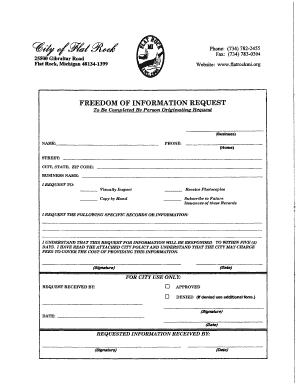
- Press the ‘Get Form’ button to access the Freedom Of Information Request form and open it in the designated editor.
- Begin by entering your name in the designated field for the person originating the request. Ensure that your name is clearly printed.
- Fill in your street address in the corresponding field. This should include your house number and street name.
- Provide your phone number in the space specified for contact information. You may include your home or business number.
- Indicate your city, state, and ZIP code in the respective fields. This helps to ensure accurate identification of your location.
- If applicable, enter your business name in the provided field. This is important if the request is being made on behalf of a business.
- Select the method in which you wish to receive the requested information by checking the appropriate boxes. Options typically include 'Visually Inspect', 'Receive Photocopies', 'Copy by Hand', or 'Subscribe to Future Issuances of these Records'.
- Write down the specific records or information you are requesting in the designated section. Be as detailed as possible to facilitate the processing of your request.
- Acknowledge your understanding of the request process and potential fees by signing and dating the form in the provided fields.
- Once your form is completed, make sure to save your changes. You may then choose to download a copy, print it out, or share it as needed.
Begin your Freedom Of Information Request today by following these steps online.
Capt. Kevin Sweeney began his career with the Michigan State Police (MSP) as a trooper working at the Newaygo Post in 1996, where he served 8 years.
Industry-leading security and compliance
US Legal Forms protects your data by complying with industry-specific security standards.
-
In businnes since 199725+ years providing professional legal documents.
-
Accredited businessGuarantees that a business meets BBB accreditation standards in the US and Canada.
-
Secured by BraintreeValidated Level 1 PCI DSS compliant payment gateway that accepts most major credit and debit card brands from across the globe.