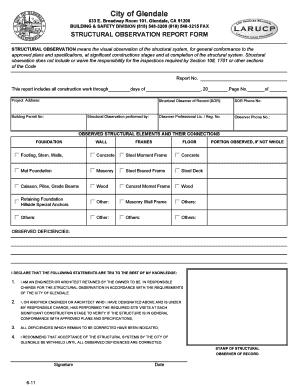
City of Glendale 633 E. Broadway Room 101. Glendale, CA 91206 BUILDING & SAFETY DIVISION (818) 548-3200 (818) 548-3215 FAX STRUCTURAL OBSERVATION REPORT FORM STRUCTURAL OBSERVATION means the visual.
Open form follow the instructions
Easily sign the form with your finger
Send filled & signed form or save
How to fill out the Structural Observation online
Completing the Structural Observation report is an important part of ensuring that a construction project adheres to approved plans and specifications. This guide will provide you with step-by-step instructions to help you successfully fill out the Structural Observation form online.
Follow the steps to complete the Structural Observation form effectively.
- Press the ‘Get Form’ button to access the Structural Observation report and launch it in your selected editor.
- Enter the report number at the top of the form. This unique identifier is essential for tracking the observation report.
- Fill in the observation period by noting all construction work through a specific number of days and the corresponding date.
- Provide the project address where the structural observation is taking place. Ensure that the address is complete and accurate.
- Input the building permit number associated with the project. This links your observation to the official permissions granted.
- Record the structural observer's details in the designated fields, including their name, phone number, and professional license or registration number.
- Identify and describe the observed structural elements and their connections. Complete this section by selecting or filling in types such as foundation, walls, frames, and flooring materials used.
- Indicate which portions of the structural elements were observed. If the entire structure was not inspected, specify which parts were assessed.
- List any observed deficiencies in construction that need correction. It is crucial to provide clear and detailed descriptions of any issues.
- Review the declaration statements, confirming you are the engineer or architect responsible for structural observation. Ensure that all statements are true to the best of your knowledge.
- Sign and date the form, including the stamp of the structural observer of record to finalize the report.
- Once completed, you can save changes, download, print, or share the form as necessary.
Complete your Structural Observation report online today and ensure a smooth inspection process.
Experience a faster way to fill out and sign forms on the web. Access the most extensive library of templates available.
Related content
I understand and agree to inform the project owner, the contractor(s), and the City of...
Structured Observation. Another observational method is structured observation. Here the...
Jan 23, 2020 — expands eligibility to 3- and 4-unit buildings that are structurally...
Get answers to your most pressing questions about US Legal Forms API.
How to make a unique logo?
Here are some tips to make your logo unique and striking. Keep It Simple. The logo's design relies majorly on the font and shape choice. ... Avoid Too Many Special Effects. ... Don't Copy. ... Use Vector Graphics. ... Think Out Of the Box. ... Keep Your Color Scheme Simple. ... Keep Fonts To A Minimum. ... Avoid Visual Cliches.
How can I draw my own logo?
Try different logo ideas, iterate on them in several different ways, and make extensive use of tracing paper. Draft something and trace it. Trace it again and again until you've simplified the visual elements down into a single doodle. Hand-drawn logos can often bear the marks of a designer's tools.
How to create a logo step by step?
Whether you choose to design a logo yourself, hire a designer, or use an online logo maker, the process will involve the same 7 steps: Develop your brand identity. Look for design inspiration. Choose colors that reflect your brand. Pick a font. Create several rough versions. Get feedback. Polish your winning design.
What are the 7 steps to design a logo?
Now, let's define the seven steps to creating memorable logos. Create a brand identity. ... Get your design inspiration. ... Choose the right colors. ... Select the right font and typeface. ... Make several rough sketches. ... Get others' feedback. ... Work on your final design. ... Understand the purpose.
How do you draft a business logo?
How to Design a Logo for Free Start With Your Story. Brainstorm Words That Describe Your Brand. Sketch Ideas Based on These Words. Test Your Top Sketches With Your Buyer Persona. Refine Your Chosen Sketch. Develop Your Logo's Layout on a Free Design Platform. Pick Versatile Color Options. Choose a Font.
How do you draft a logo?
How to design a logo Define your brand identity. Seek inspiration. Determine logo style. Choose a type. Decide on a color scheme. Pick a font. Outline a logo shape. Create a logo.
What are 5 steps in creating logo?
Here's a visual that summarizes the five-step process that I will discuss: Step 1: Design Brief. ... Step 2: Research. ... Step 3: Build the Design Concepts. ... Step 4: Feedback and Review. ... Step 5: Presentation.
How to create a logo in PDF?
To convert your logo to a PDF, follow these steps: Click File on the top toolbar of your design program. Choose the Print option. In the Printer selection drop-down, select Print to PDF. Browse for the folder where you want to save the logo. Click Print.
Use professional pre-built templates to fill in and sign documents online faster. Get access to thousands of forms.
If you believe that this page should be taken down, please follow our DMCA take down process here.