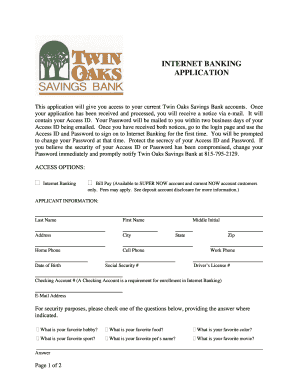
Get Click Here To Apply For Online Banking - Twin Oaks Savings Bank
How it works
-

Open form follow the instructions
-

Easily sign the form with your finger
-

Send filled & signed form or save
How to fill out the Click Here To Apply For Online Banking - Twin Oaks Savings Bank online
This guide provides clear and supportive instructions on completing the Click Here To Apply For Online Banking application for Twin Oaks Savings Bank. Follow these steps to smoothly navigate through the form and ensure your online banking access.
Follow the steps to complete your online banking application.
- Click the ‘Get Form’ button to access the application form and open it within the editor for completion.
- Begin by entering your personal information in the Applicant Information section. Fill out your last name, first name, middle initial, address, city, state, zip code, and phone numbers (home, cell, and work). Ensure that all provided information is accurate and up to date.
- Enter your date of birth and social security number. This information is essential for identity verification and must be filled out carefully.
- Input your driver’s license number and checking account number. Note that having an active checking account is mandatory for enrolling in internet banking services.
- Provide your email address. This will be used for communication regarding your application and online banking access.
- For security purposes, select one of the listed security questions and provide an answer. Choose something memorable that you can easily recall.
- Review the Terms and Conditions of Twin Oaks’s Savings Banking service. Indicate that you have read and accepted them by checking the corresponding box.
- Sign the application and date it. If you have a co-owner for the account, ensure they also sign where indicated.
- Once the application is completed, you may either save your changes, download, print, or share the form as needed.
- Submit your completed application form in person at one of the Twin Oaks Savings Bank locations listed in the document.
Complete your application form online today to start enjoying the convenience of Twin Oaks Savings Bank's online banking services.
0:10 1:52 How to set up mobile banking on your phone or tablet | Money on your Mind YouTube Start of suggested clip End of suggested clip Now to check that it's definitely you or send a one-time passcode via. Text message to the mobileMoreNow to check that it's definitely you or send a one-time passcode via. Text message to the mobile phone registered on your account. If you don't get that text please get in touch.
Industry-leading security and compliance
-
In businnes since 199725+ years providing professional legal documents.
-
Accredited businessGuarantees that a business meets BBB accreditation standards in the US and Canada.
-
Secured by BraintreeValidated Level 1 PCI DSS compliant payment gateway that accepts most major credit and debit card brands from across the globe.