Loading
Form preview
  • US Legal Forms
  • Other Templates
  • More Forms
  • More Uncategorized Forms
  • Direct Debit Request Form - Westpac Online Investing

Get Direct Debit Request Form - Westpac Online Investing

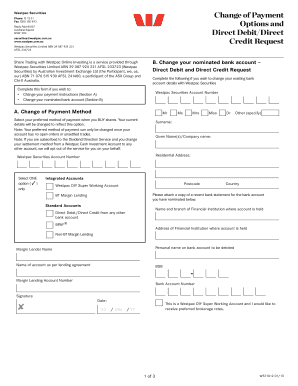
Westpac Securities Phone 13 13 31 Fax1300130493 ReplyPaid85157 Australia Square NSW1214 securities westpac.com.au www.westpac.com.au WestpacSecuritiesLimitedABN39087924221 AFSL233723 Change of Payment.

How it works

  1. Open form

    Open form follow the instructions

  2. Easily sign form

    Easily sign the form with your finger

  3. Share form

    Send filled & signed form or save

How to fill out the Direct Debit Request Form - Westpac Online Investing online

Filling out the Direct Debit Request Form is an important step for users wishing to change their payment methods or nominated bank accounts with Westpac Online Investing. This guide will provide you with clear, step-by-step instructions to ensure a smooth completion of the form for your investment needs.

Follow the steps to complete the Direct Debit Request Form.

  1. Click ‘Get Form’ button to access the Direct Debit Request Form and open it in your chosen editor.
  2. Begin by entering your Westpac Securities account number at the top of the form to ensure it is linked to the correct account.
  3. In section A, select your preferred method of payment when buying shares by checking the appropriate box. Remember, your current instructions can only be modified when there are no open orders or unsettled trades.
  4. Fill in your personal details, including your surname, given name(s) or company name, and your residential address. Ensure accuracy as this information will be used for verification purposes.
  5. Provide the name and branch of your financial institution where your nominated bank account is held, along with the bank account number and BSB.
  6. In section B, you will enter details regarding the bank account that you wish to use for debits. It's crucial that the name on the bank account matches the person or entity as per the brokerage registration.
  7. Attach a recent bank statement for the nominated account to verify your details.
  8. Read and acknowledge the terms and conditions outlined in the Direct Debit and Direct Credit Request Service Agreement, ensuring you understand the implications of your selections.
  9. Sign and date the form at the bottom. If there are multiple account holders, additional signatures may be required.
  10. Once completed, you may save the changes, download, print, or share the form as needed, or send it to Westpac Securities via the provided mailing address or fax.

Complete your Direct Debit Request Form online to manage your investment payments efficiently.

Get form

Experience a faster way to fill out and sign forms on the web. Access the most extensive library of templates available.
Get form

Related content

Westpac Banking Corporation - SEC.gov
Westpac Institutional Bank: providing banking, financial and advisory services to ... In...
Learn more
attachment c - James Madison University
Jun 1, 2020 — Group 4 “International Payments and Banking”. 4. ... Direct Debits and...
Learn more
Quickstream WBC User Guide - UserManual.wiki
Westpac Banking Corporation ABN 33 007 457 141. Quickstream ... 7.2.1.4 Merchant Bank...
Learn more

Related links form

Certificate Of Merit - Tusla Ngoab Forms INSTRUMENT SERVICE MAINTENANCE REPORT - Um2 Umac Ndt Request Form

Questions & Answers

Get answers to your most pressing questions about US Legal Forms API.

Contact support

A Direct Debit Request (DDR) is your authorisation to debit your customer's account. An eDDR is the electronic version of the DDR. An eDDR enables you to sign customers up on the go via a tablet, smartphone or website.

In the Westpac App Tap Cards. Select the card you want to autopay. Tap Payment options. Tap Autopay. Tap the account to Pay from. Select an eligible account from the list. Tap to set up the Card Autopay option. Tap Done.

How to set up a recurring payment Tap $ and select Payment type. Select who to pay. Select the account you'd like to pay From. Enter the Amount. Tap Schedule then select the date and how often to make the payment.

Get in touch with them and ask to set up a Direct Debit....You'll need to provide: Your name and address. The name and address of your bank or building society. Your bank or building society account number. The branch sort code of your bank or building society (see your debit card or banking app) The name(s) on the account.

You can complete a Direct Debit Instruction, obtained from the organisation you wish to pay, and return it to them. With many organisations, you can set up Direct Debits over the telephone or online.

Simplify things and never miss a repayment with direct debit. To set up or change a direct debit, you just need to: Be registered for Online Banking. Be debiting a Westpac account in your name.

You're unable to change the amount or frequency of your repayments. You can set up or cancel an existing direct debit via Online Banking or the Westpac App. However, if you'd like to make separate, additional repayments on an interest only home loan, just sign in to Online Banking and set up a recurring payment.

A Direct Debit is an instruction from you to your bank that authorises a company to take an agreed amount of money from your account. You won't be able to create a new Direct Debit yourself. You'll need to contact the company you want to pay and they'll arrange for you to complete a Direct Debit instruction.

Get This Form Now!

Use professional pre-built templates to fill in and sign documents online faster. Get access to thousands of forms.
Get form
If you believe that this page should be taken down, please follow our DMCA take down processhere.
Get Direct Debit Request Form - Westpac Online Investing
Get form
  • Adoption
  • Bankruptcy
  • Contractors
  • Divorce
  • Home Sales
  • Employment
  • Identity Theft
  • Incorporation
  • Landlord Tenant
  • Living Trust
  • Name Change
  • Personal Planning
  • Small Business
  • Wills & Estates
  • Packages A-Z
  • Affidavits
  • Bankruptcy
  • Bill of Sale
  • Corporate - LLC
  • Divorce
  • Employment
  • Identity Theft
  • Internet Technology
  • Landlord Tenant
  • Living Wills
  • Name Change
  • Power of Attorney
  • Real Estate
  • Small Estates
  • Wills
  • All Forms
  • Forms A-Z
  • Other Templates
  • Legal Hub
  • About Us
  • Help Portal
  • Legal Resources
  • Blog
  • Affiliates
  • Contact Us
  • Delete My Account
  • Site Map
  • Industries
  • Forms in Spanish
  • Localized Forms
  • State-specific Forms
  • Forms Kit
  • Real Estate Handbook
  • All Guides
  • Notarize
  • Incorporation services
  • For Consumers
  • For Small Business
  • For Attorneys
  • USLegal
  • FormsPass
  • pdfFiller
  • signNow
  • altaFlow
  • DocHub
  • Instapage
Form Packages
  • Adoption
  • Bankruptcy
  • Contractors
  • Divorce
  • Home Sales
  • Employment
  • Identity Theft
  • Incorporation
  • Landlord Tenant
  • Living Trust
  • Name Change
  • Personal Planning
  • Small Business
  • Wills & Estates
  • Packages A-Z
Form Categories
  • Affidavits
  • Bankruptcy
  • Bill of Sale
  • Corporate - LLC
  • Divorce
  • Employment
  • Identity Theft
  • Internet Technology
  • Landlord Tenant
  • Living Wills
  • Name Change
  • Power of Attorney
  • Real Estate
  • Small Estates
  • Wills
  • All Forms
  • Forms A-Z
  • Other Templates
Customer Service
  • Legal Hub
  • About Us
  • Help Portal
  • Legal Resources
  • Blog
  • Affiliates
  • Contact Us
  • Delete My Account
  • Site Map
  • Industries
  • Forms in Spanish
  • Localized Forms
  • State-specific Forms
  • Forms Kit
Legal Guides
  • Real Estate Handbook
  • All Guides
Prepared for you
  • Notarize
  • Incorporation services
Our Customers
  • For Consumers
  • For Small Business
  • For Attorneys
Our Sites
  • USLegal
  • FormsPass
  • pdfFiller
  • signNow
  • altaFlow
  • DocHub
  • Instapage
Social Media
Call us now toll free:
+1 833 426 79 33
As seen in:
© Copyright 1999-2026 airSlate Legal Forms, Inc. 17 Station Street, Ste. 203, Brookline, MA 02445
  • Your Privacy Choices
  • Terms of Service
  • Privacy Notice
  • Content Takedown Policy
  • Bug Bounty Program