Loading
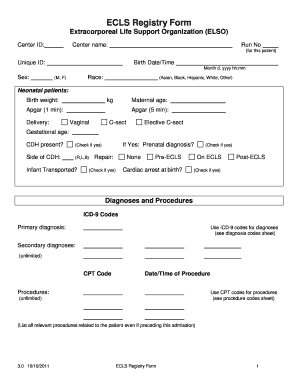
Get Ecls Registry Form - Extracorporeal Life Support Organization - Elso Med Umich
How it works
-

Open form follow the instructions
-

Easily sign the form with your finger
-

Send filled & signed form or save
How to fill out the ECLS Registry Form - Extracorporeal Life Support Organization - Elso Med Umich online
Completing the ECLS Registry Form is essential for documenting patient information for the Extracorporeal Life Support Organization. This guide provides a clear, step-by-step approach to help users accurately fill out the form online.
Follow the steps to successfully complete the ECLS Registry Form.
- Press the ‘Get Form’ button to access the ECLS Registry Form and open it in your browser.
- Begin by entering the Center ID and Center name in the designated fields. This identifies the facility completing the form.
- Input the Run No for the patient, ensuring all alphanumeric characters are accurate.
- Fill out the Unique ID, followed by the patient's Birth Date/Time, ensuring to include the specific format: Month d, yyyy hh:mm.
- Select the patient's Sex and Race from the dropdown options provided.
- For neonatal patients, input the Birth weight in kilograms and Maternal age.
- Complete the Apgar scores for both 1 minute and 5 minutes after birth and indicate the type of delivery.
- Fill in the Gestational age and indicate if Congenital Diaphragmatic Hernia (CDH) is present. If yes, select the side affected.
- Indicate whether the infant was transported and provide prenatal diagnosis if applicable.
- Document the Pre-ECLS and Post-ECLS statuses, including any diagnoses and procedures using the appropriate ICD-9 and CPT codes.
- Record relevant cultured organisms, specifying the site and the date/time for each entry.
- Fill out the Pre-ECLS course details including date/time admitted, intubation status, and current weight.
- Document hemodynamic measures and ventilator settings prior to ECLS support, as specified in the form.
- Complete sections on the ECLS course, noting the date/time on and off ECLS, reason for support, and cannulation details.
- Identify any complications experienced during treatment, both mechanical and patient-related. Check all relevant boxes.
- Finally, assess the outcome of ECLS, selecting the reason for its discontinuation, and complete the details regarding discharge or date of death.
- Once all sections are filled, review your entries thoroughly, then save changes, download, print, or share the form as required.
Complete your ECLS Registry Form online today to ensure accurate and timely patient documentation.
Related links form
Extracorporeal life support (ECLS), also known as Extracorporeal Membrane Oxygenation (ECMO), provides extended cardiac and respiratory support to persons whose heart and lungs cannot adequately function to sustain life.
Industry-leading security and compliance
US Legal Forms protects your data by complying with industry-specific security standards.
-
In businnes since 199725+ years providing professional legal documents.
-
Accredited businessGuarantees that a business meets BBB accreditation standards in the US and Canada.
-
Secured by BraintreeValidated Level 1 PCI DSS compliant payment gateway that accepts most major credit and debit card brands from across the globe.