Loading
Get Request For Waiver Of Noncustodial Profile - Financialaid Arizona
How it works
-

Open form follow the instructions
-

Easily sign the form with your finger
-

Send filled & signed form or save
How to fill out the REQUEST FOR WAIVER OF NONCUSTODIAL PROFILE - Financialaid Arizona online
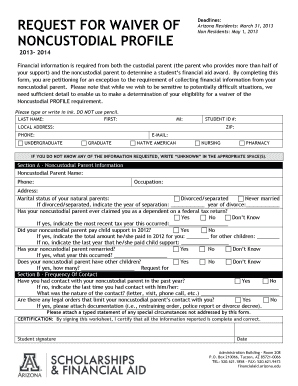
This guide provides clear and supportive instructions on how to fill out the REQUEST FOR WAIVER OF NONCUSTODIAL PROFILE form for financial aid at Arizona. Completing this form is crucial for those seeking a waiver from providing financial information from a noncustodial parent.
Follow the steps to successfully complete your waiver request.
- Click the ‘Get Form’ button to obtain the form and open it for editing.
- Begin by entering your personal information, including your last name, first name, middle initial, student ID number, local address, ZIP code, phone number, email, and your educational status (e.g., undergraduate or graduate). Be sure to type the information clearly or write in ink, avoiding the use of pencil.
- Proceed to Section A – Noncustodial Parent Information, where you will provide details about your noncustodial parent. Include their name, phone number, occupation, and address. Additionally, indicate the marital status of your natural parents and provide the year of separation or divorce if applicable.
- Answer questions regarding your noncustodial parent's claims of you as a dependent on a federal tax return, child support payments, remarriage status, and the number of other children they may have. Provide context where necessary, such as the year they last paid child support.
- Move to Section B – Frequency of Contact. Indicate if you have had contact with your noncustodial parent in the past year. If not, provide the last contact date and the nature of that contact. Report any legal orders limiting their contact with you, including attachments of supportive documentation if applicable.
- Attach a typed statement outlining any special circumstances that you believe are important for the review of your waiver request but are not addressed in the form.
- Finally, review all the information for completeness and accuracy. Sign and date the certification section to confirm that the information provided is true.
- Once completed, you can save your changes, download the form for your records, print it if necessary, or share it with the appropriate department as instructed.
Complete your REQUEST FOR WAIVER OF NONCUSTODIAL PROFILE online and ensure your financial aid process proceeds smoothly.
1. Download PhotoDirector—Best App to Remove People from Photos Download PhotoDirector. Tap Edit and Choose the Photo. Tap “Removal” to Remove People from Photos. Brush on People You Want to Remove. Click Remove and Save the Photo.
Industry-leading security and compliance
US Legal Forms protects your data by complying with industry-specific security standards.
-
In businnes since 199725+ years providing professional legal documents.
-
Accredited businessGuarantees that a business meets BBB accreditation standards in the US and Canada.
-
Secured by BraintreeValidated Level 1 PCI DSS compliant payment gateway that accepts most major credit and debit card brands from across the globe.