Loading
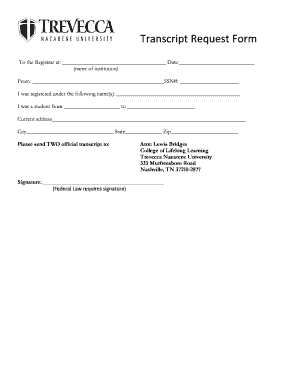
Get Trevecca Transcript Request
How it works
-

Open form follow the instructions
-

Easily sign the form with your finger
-

Send filled & signed form or save
How to fill out the Trevecca Transcript Request online
Filling out the Trevecca Transcript Request is an important step for obtaining your academic records. This guide will provide clear instructions to help you complete the online form efficiently and accurately.
Follow the steps to successfully complete your transcript request.
- Press the ‘Get Form’ button to access the transcript request form and open it in your preferred online editor.
- In the first section, input the name of the institution you are requesting the transcript from in the designated space. This should be filled out clearly to avoid delays.
- Provide the date on which you are submitting the request. Ensure that the date format matches the requirements.
- In the section labeled 'From,' enter your full name and social security number (SSN) to identify your records accurately.
- Next, indicate any name(s) under which you were registered during your time at the institution, if applicable. This helps to trace your academic records accurately.
- Enter the date range during which you were a student. Fill in the start and end dates to complete this section.
- Input your current address, including the street, city, state, and zip code, ensuring it is complete and correct for mailing purposes.
- In the section requesting where the transcripts should be sent, write the necessary recipient details as follows: Attn: Lewis Bridges, College of Lifelong Learning, Trevecca Nazarene University, 333 Murfreesboro Road, Nashville, TN 37210-2877.
- Finally, remember to sign the form. Note that federal law requires a signature, so this step is crucial for processing your request.
- Once all sections are completed, you can save your changes. At this point, you may choose to download, print, or share the form as needed.
Take action now and complete your transcript request online.
A transcript is an official document that shows the courses you have taken, the grades earned, and a cumulative grade point average (GPA). A transcript is not a diploma. Most colleges require that you submit a transcript, not a diploma, as part of the college admissions process.