Loading
Get Kuinafill Form
How it works
-

Open form follow the instructions
-

Easily sign the form with your finger
-

Send filled & signed form or save
How to fill out the Kuinafill Form online
Filling out the Kuinafill Form online can be a straightforward process if you approach it step by step. This guide provides clear instructions on each section of the form, ensuring you have all the necessary information at your fingertips.
Follow the steps to complete the Kuinafill Form effectively.
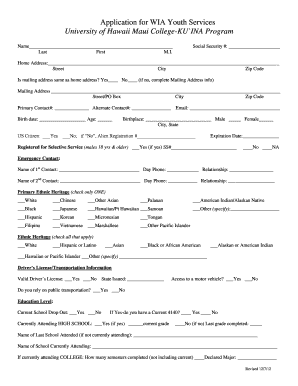
- Click ‘Get Form’ button to access the Kuinafill Form and open it in the editor.
- Begin by entering your full name in the designated fields: last name, first name, and middle initial.
- Input your Social Security number in the specified area.
- Fill in your home address, including the street name, city, and zip code. If your mailing address differs from your home address, select 'No' and complete the mailing address section.
- Provide your primary and alternate contact numbers.
- Enter your birth date and age. Indicate whether you are a US citizen by checking the appropriate box and providing your birthplace.
- If you answered 'No' to US citizenship, fill in your Alien Registration number and expiration date.
- For males aged 18 and older, confirm if you are registered for Selective Service and include your SS number if applicable.
- Complete the emergency contact section by providing the name, phone number, and relationship of two emergency contacts.
- Select your primary ethnic heritage by checking only one box from the list provided.
- In the ethnic heritage section, check all that apply that describe your background.
- Provide your driver's license information, including whether it's valid and the state it was issued in. Indicate your transportation access.
- Fill in your education level, noting your current or last school and grade information.
- Indicate your household family size and income, based on the last six months of earnings from all sources.
- Identify any individual barriers you may face and whether you require additional assistance.
- Declare your military status if applicable and provide necessary details related to your service.
- List any public assistance received and employment status, including current job details if employed.
- Certify the accuracy of your information by signing and dating the form at the designated sections for both yourself and your parent/guardian if under 18.
- Answer the additional questions at the end of the form regarding your personal and academic goals.
- Once completed, save your changes, download, print, or share the Kuinafill Form as needed.
Start filling out your Kuinafill Form online today to access the resources you need.
Daikichi's surname Karube means "cutting (grass)" (苅) (karu) and "part, department, category" (部) (be).