Loading
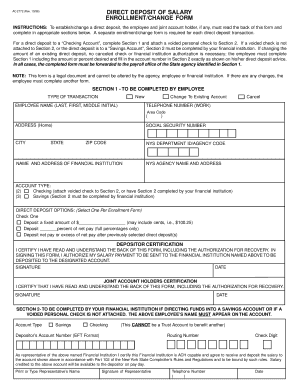
Get Direct Deposit Of Salary Enrollment/change Form - Wings - Wings Buffalo
How it works
-

Open form follow the instructions
-

Easily sign the form with your finger
-

Send filled & signed form or save
How to fill out the Direct Deposit Of Salary Enrollment/change Form - Wings - Wings Buffalo online
This guide provides a clear and supportive walkthrough for completing the Direct Deposit Of Salary Enrollment/change Form. Whether you are establishing a new direct deposit or changing existing details, following these steps will help ensure your information is submitted accurately and efficiently.
Follow the steps to successfully complete the form online.
- Click ‘Get Form’ button to obtain the form and open it in your editor.
- In Section 1, indicate the type of transaction you are completing — 'New', 'Change To Existing Account', or 'Cancel'. Fill in your full name (last, first, middle initial), telephone number, home address, and social security number. You will also need to provide your New York State department ID or agency code.
- Next, provide the name and address of the financial institution where the direct deposit will occur. Specify the account type: Checking (attach a voided check to Section 2) or Savings (Section 2 must be completed by your financial institution).
- In the Direct Deposit Options section, select one of the options provided: deposit a fixed amount, deposit a percentage of net pay, or deposit net pay after other chosen direct deposits. If choosing a fixed amount, be sure to clearly write the amount.
- Review the Depositor Certification statement. By signing, you are confirming your understanding of the form, including the authorization for recovery of funds deposited in error. Sign and date the form.
- If you have a joint account holder, they must also complete the Joint Account Holders Certification section by signing and dating the form.
- If your direct deposit is going into a Savings Account or if you did not attach a voided check, ensure Section 2 is completed by your financial institution. This should include the account type, account number, routing number, check digit, and the financial institution representative’s certification.
- Finally, submit the completed form to the payroll office of the State agency identified in Section 1. You may save your changes, download the completed form, or print it for your records.
Complete your form online today to ensure smooth handling of your direct deposit transactions.
How to Add Checkbox in PDF on Mac Launch the software on your Mac and open the document you want to use for Checkbox. From the menu bar, choose Form> Create/Edit Form. Choose the "Checkbox" option from the toolbar. ... By double-clicking on the Checkbox, you can explore options to edit and name the Checkbox.
Industry-leading security and compliance
US Legal Forms protects your data by complying with industry-specific security standards.
-
In businnes since 199725+ years providing professional legal documents.
-
Accredited businessGuarantees that a business meets BBB accreditation standards in the US and Canada.
-
Secured by BraintreeValidated Level 1 PCI DSS compliant payment gateway that accepts most major credit and debit card brands from across the globe.