Loading
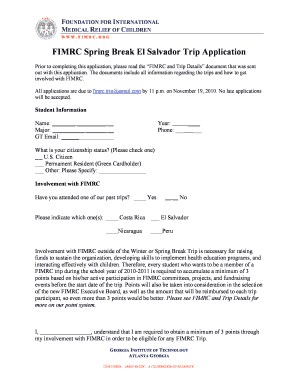
Get Fimrc El Salvador Application - Georgia Institute Of Technology - Hts Gatech
How it works
-

Open form follow the instructions
-

Easily sign the form with your finger
-

Send filled & signed form or save
How to fill out the FIMRC El Salvador Application - Georgia Institute Of Technology - Hts Gatech online
Completing the FIMRC El Salvador Application online is an essential step for students interested in participating in this rewarding experience. This guide provides detailed instructions to help users navigate each section of the application smoothly.
Follow the steps to successfully complete your application.
- Click ‘Get Form’ button to obtain the form and open it for editing.
- Enter your personal information in the Student Information section. This includes your name, major, GT email, year, and phone number. Ensure all details are accurate and complete.
- Indicate your citizenship status by checking the appropriate box for U.S. Citizen, Permanent Resident, or Other. If you select Other, please specify your status.
- Provide information regarding your past involvement with FIMRC. Indicate whether you have attended previous trips and specify which ones if applicable. This section is crucial for your application evaluation.
- Acknowledge the requirement of accumulating a minimum of 3 points through active participation in FIMRC activities. Sign the statement confirming your understanding of this requirement.
- Fill out the Trip Location section by indicating your ability to cover the trip costs and specify how much you can contribute if necessary.
- Answer the question regarding your Spanish language proficiency, choosing your level: Beginner, Intermediate, Advanced, or Fluent.
- Complete the Short Essay section by writing responses to the three prompts provided, ensuring each essay is limited to 300 words.
- Review all filled-in information for accuracy. Make any necessary edits.
- Once you are satisfied with your application, save changes, and ensure you have a copy for your records before submission.
- Email your completed application to fimrc.trip@gmail.com by the deadline specified in the application instructions.
Begin filling out your application online today to ensure your participation in this impactful initiative.
Add some graphic impact In this step, you'll add an effect to give the title some depth. With the text selected, choose Effect > (Illustrator Effects) Stylize > Drop Shadow. Try changing the Mode, Opacity, Offset, Blur, and Color settings. Select Preview to see the live effects, and then click OK.
Industry-leading security and compliance
US Legal Forms protects your data by complying with industry-specific security standards.
-
In businnes since 199725+ years providing professional legal documents.
-
Accredited businessGuarantees that a business meets BBB accreditation standards in the US and Canada.
-
Secured by BraintreeValidated Level 1 PCI DSS compliant payment gateway that accepts most major credit and debit card brands from across the globe.