Loading
Get Florida Prepaid Transfer Form - Flsouthern
How it works
-

Open form follow the instructions
-

Easily sign the form with your finger
-

Send filled & signed form or save
How to fill out the Florida Prepaid Transfer Form - Flsouthern online
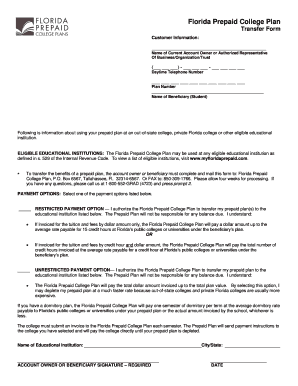
This guide provides step-by-step instructions for filling out the Florida Prepaid Transfer Form - Flsouthern online. Designed for both experienced users and those new to the process, this resource will ensure that you provide all the necessary information accurately.
Follow the steps to complete the form online.
- Click 'Get Form' button to obtain the form and open it in the online editor.
- Enter the name of the current account owner or authorized representative in the space provided. This information refers to the person responsible for the prepaid plan.
- Provide a daytime telephone number including the area code. Ensure the number is current and accessible for any inquiries.
- Input the plan number associated with your Florida Prepaid College Plan. This number is essential for identifying your specific account.
- Enter the name of the beneficiary, who is the student intended to use the prepaid plan. This is important for linking the plan benefits to the correct individual.
- Choose a payment option by selecting either the restricted or unrestricted payment option. Make sure to read the associated descriptions for both options to understand the implications.
- Provide the name and city/state of the educational institution where the benefits will be transferred. Ensure accuracy to avoid any processing issues.
- Sign and date the form in the designated areas. Both the account owner and beneficiary's signatures may be required, depending on the specifics of your situation.
- Once you have filled out all required information, save your changes. You can then download, print, or share the completed form as needed.
Complete your Florida Prepaid Transfer Form online today to ensure a smooth transfer of benefits.
You may transfer your Florida 529 Savings Plan to another eligible student or close the plan and withdraw the remaining balance. Any earnings that are not used for Qualified Higher Education Expenses are subject to federal and, if applicable, state income taxes.
Industry-leading security and compliance
US Legal Forms protects your data by complying with industry-specific security standards.
-
In businnes since 199725+ years providing professional legal documents.
-
Accredited businessGuarantees that a business meets BBB accreditation standards in the US and Canada.
-
Secured by BraintreeValidated Level 1 PCI DSS compliant payment gateway that accepts most major credit and debit card brands from across the globe.