Loading
Form preview
  • US Legal Forms
  • Form Library
  • More Forms
  • More Uncategorized Forms
  • Ctdol

Get Ctdol

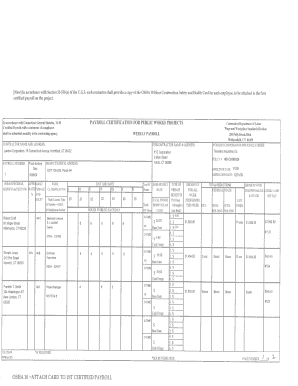
99 30. 75 Wethersfield CT 06109 1- OSHA 10 -ATTACH PAYROLL CERTIFICATION CARD TO 1ST CERTIFIED PAYROLL Safety and Health Card for each employee 1/1/09 O-TIME SEE WEEKLY PAYROLL REVERSE EFFECTIVE DATE EXPIRATION FOR PUBLIC SUBCONTRACTOR SIDENAME ADDRESS WORKS PROJECTS BENEFITS XYZ Corporation Connecticut Department of Labor DATE to be attached to the first Vage and Vorkplace Standards Diyision J FRINGE BENEFITS EXPLANATION P Bona fide benefits pai.

How it works

  1. Open form

    Open form follow the instructions

  2. Easily sign form

    Easily sign the form with your finger

  3. Share form

    Send filled & signed form or save

How to fill out the Ctdol online

Filling out the Ctdol form accurately is crucial for compliance with Connecticut's labor regulations. This guide will provide step-by-step instructions to ensure that you complete the form correctly and efficiently.

Follow the steps to fill out the Ctdol form with ease.

  1. Click the ‘Get Form’ button to access the Ctdol form and open it in your preferred document editor.
  2. Enter the project owner's name and address in the designated fields. Make sure to have accurate and up-to-date information to avoid any discrepancies.
  3. Complete the employee details section. This includes inputting the names, classifications, and hours worked for each employee involved in the project.
  4. Fill out the wage information correctly. Specify the hourly rates, fringe benefits, and total gross pay for the reporting period.
  5. Ensure compliance by signing the certified statement of compliance section. Verify that all statements regarding payment practices and insurance coverage are accurately reflected.
  6. Review all entries meticulously for accuracy. Once confirmed, save your changes, and you may also choose to download, print, or share the completed form.

Complete your documents online with confidence and ensure compliance by following these steps.

Get form

Experience a faster way to fill out and sign forms on the web. Access the most extensive library of templates available.
Get form

Related content

State of Connecticut Department of Labor
... of Labor, CT Department of Labor, CT Dept of Labor, CT DOL, UI, unemployment...
Learn more
table of contents - Connecticut Department of...
The Connecticut Department of Labor (CTDOL) is working hard to help our claimants have...
Learn more
ct-dol | Python Package Wiki
pip install ct-dol==0.1.1. A tool for pulling down ct unemployment as a dataframe. Source...
Learn more

Related links form

Pcr Ems Employee Statement Form 2020 Navmc 11753 2020 Cg 2012 2020

Questions & Answers

Get answers to your most pressing questions about US Legal Forms API.

Contact support

In Connecticut, the maximum weekly unemployment benefit amount can vary based on your previous earnings, but as of now, it is capped at a specific limit set by CTDOL. This limit is periodically reviewed and adjusted, so it is important to check the latest updates on the CTDOL website. Additionally, ensure you apply for benefits promptly to maximize the support you receive during your unemployment period. For comprehensive guidance on unemployment benefits and applications, explore the solutions offered by uslegalforms.

To calculate your unemployment benefits in CT, start by gathering your income information from your base period, which is usually the first four of the last five completed calendar quarters. The Connecticut Department of Labor (CTDOL) uses this data to determine your weekly benefit amount. You can also use the online benefits calculator provided by CTDOL for a quick estimate. For more detailed assistance, consider using resources available on the uslegalforms platform to help navigate the process.

In Connecticut, various factors can disqualify you from receiving unemployment benefits through Ctdol. These could include voluntarily quitting your job without a valid reason, being fired for misconduct, or failing to actively seek employment. It is crucial to understand these disqualifications to prevent any issues with your claim. For clarity on your situation, consider consulting the resources available on the US Legal Forms platform.

The best way to file for unemployment is to use the Ctdol online system, as it is designed to streamline the process. Make sure to gather all necessary documents, such as your identification and earnings records, before starting your application. This preparation will help you avoid delays. Additionally, US Legal Forms can provide you with templates to ensure that you file your claim correctly and efficiently.

To file for unemployment through Ctdol, first ensure you meet eligibility requirements. Visit the Ctdol website to access the online filing system, where you can submit your application. It is essential to provide correct information about your work history and reason for unemployment. For additional support, US Legal Forms offers resources to help you complete your application accurately.

To fill out your employment application through Ctdol, start by gathering all necessary personal information, including your Social Security number and employment history. Next, follow the prompts on the Ctdol website to enter your details accurately. If you encounter any difficulties, consider using the US Legal Forms platform, which provides easy-to-follow templates and guidance for completing employment forms.

CTDOL Main Phone Number. Phone: 860.263.6000. CTDOL unit information. CTDOL phone directory. Department of Labor Assistance Center/Telephone Directory. CTDOL Address. Connecticut Department of Labor. 200 Folly Brook Boulevard. Wethersfield, CT 06109.

Extended Benefits, a 13-week extension to regular state unemployment benefits, expire when the state's three-month average unemployment rate falls below 6.5%.

If CTDOL requests information from you or your employer, an imposter claim may have been filed with us indicating you may be a victim of identity theft. You receive a monetary determination letter.

In addition, questions can be sent via email at dol.webhelp@ct.gov. All emails will be answered within 3 to 5 business days.

Get This Form Now!

Use professional pre-built templates to fill in and sign documents online faster. Get access to thousands of forms.
Get form
If you believe that this page should be taken down, please follow our DMCA take down processhere.

Industry-leading security and compliance

US Legal Forms protects your data by complying with industry-specific security standards.
  • In businnes since 1997
    25+ years providing professional legal documents.
  • Accredited business
    Guarantees that a business meets BBB accreditation standards in the US and Canada.
  • Secured by Braintree
    Validated Level 1 PCI DSS compliant payment gateway that accepts most major credit and debit card brands from across the globe.
Get Ctdol
Get form
Form Packages
Adoption
Bankruptcy
Contractors
Divorce
Home Sales
Employment
Identity Theft
Incorporation
Landlord Tenant
Living Trust
Name Change
Personal Planning
Small Business
Wills & Estates
Packages A-Z
Form Categories
Affidavits
Bankruptcy
Bill of Sale
Corporate - LLC
Divorce
Employment
Identity Theft
Internet Technology
Landlord Tenant
Living Wills
Name Change
Power of Attorney
Real Estate
Small Estates
Wills
All Forms
Forms A-Z
Form Library
Customer Service
Your Privacy Choices
Terms of Service
Privacy Notice
Legal Hub
Content Takedown Policy
Bug Bounty Program
About Us
Help Portal
Legal Resources
Blog
Affiliates
Contact Us
Delete My Account
Site Map
Industries
Forms in Spanish
Localized Forms
State-specific Forms
Forms Kit
Legal Guides
Real Estate Handbook
All Guides
Prepared for You
Notarize
Incorporation services
Our Customers
For Consumers
For Small Business
For Attorneys
Our Sites
US Legal Forms
USLegal
FormsPass
pdfFiller
signNow
altaFlow
DocHub
Instapage
Social Media
Call us now toll free:
+1 833 426 79 33
As seen in:
  • USA Today logo picture
  • CBC News logo picture
  • LA Times logo picture
  • The Washington Post logo picture
  • AP logo picture
  • Forbes logo picture
© Copyright 1997-2026
airSlate Legal Forms, Inc.
3720 Flowood Dr, Flowood, Mississippi 39232
Form Packages
Adoption
Bankruptcy
Contractors
Divorce
Home Sales
Employment
Identity Theft
Incorporation
Landlord Tenant
Living Trust
Name Change
Personal Planning
Small Business
Wills & Estates
Packages A-Z
Form Categories
Affidavits
Bankruptcy
Bill of Sale
Corporate - LLC
Divorce
Employment
Identity Theft
Internet Technology
Landlord Tenant
Living Wills
Name Change
Power of Attorney
Real Estate
Small Estates
Wills
All Forms
Forms A-Z
Form Library
Customer Service
Your Privacy Choices
Terms of Service
Privacy Notice
Legal Hub
Content Takedown Policy
Bug Bounty Program
About Us
Help Portal
Legal Resources
Blog
Affiliates
Contact Us
Delete My Account
Site Map
Industries
Forms in Spanish
Localized Forms
State-specific Forms
Forms Kit
Legal Guides
Real Estate Handbook
All Guides
Prepared for You
Notarize
Incorporation services
Our Customers
For Consumers
For Small Business
For Attorneys
Our Sites
US Legal Forms
USLegal
FormsPass
pdfFiller
signNow
altaFlow
DocHub
Instapage
Social Media
Call us now toll free:
+1 833 426 79 33
As seen in:
  • USA Today logo picture
  • CBC News logo picture
  • LA Times logo picture
  • The Washington Post logo picture
  • AP logo picture
  • Forbes logo picture
© Copyright 1997-2026
airSlate Legal Forms, Inc.
3720 Flowood Dr, Flowood, Mississippi 39232